.svg)
AI Search (Beta) is a new way to create property searches using natural language. Instead of manually selecting filters, you can describe exactly what you’re looking for and the system builds the search for you. This makes it faster to create accurate searches that power property alerts and website content.
Need to Know
-
AI Search allows you to create property searches that alert your customers or generate website pages using natural language instead of manual filters
-
The feature is currently in beta and results may occasionally be imperfect
-
AI Search does not replace existing search tools; all current workflows remain available
Table of Contents
What is AI Search?
AI Search allows you to generate property searches by typing exactly what you want, just like you would describe it to a client.
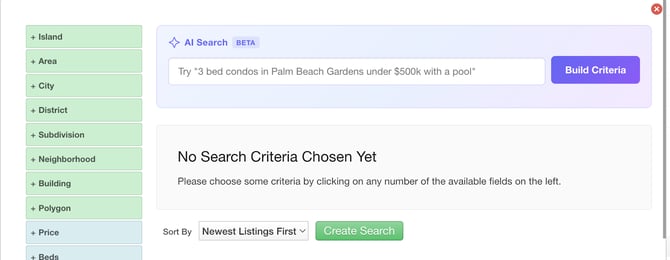
Examples:
-
3 bedroom condos in Palm Beach Gardens under $500k
-
4 bed, 3 bath homes in San Antonio with a pool under $400k
-
Farmhouse style homes in Austin with at least 2 acres, and no HOA under $1M
The system interprets your request and creates a matching search instantly.
Why We Built It
Property alerts are the most important communication sent from your Real Geeks system. They drive return traffic, keep leads engaged, and play a key role in conversion.
Every property alert is powered by a saved search.
Creating high-quality saved searches has traditionally required navigating a complex set of filters. This becomes difficult when buyers have specific or nuanced criteria.
As a result:
-
Searches take longer to build
-
Important details can be missed
-
Alerts become too broad and less relevant
The same challenge exists when creating website pages. Building niche, SEO-focused pages requires configuring precise searches that reflect how buyers actually search, not how MLS data is structured.
AI Search solves this by allowing you to describe the intent in plain language and automatically generating the correct search.
Where You Can Use It
CRM: Super Duper Saved Search
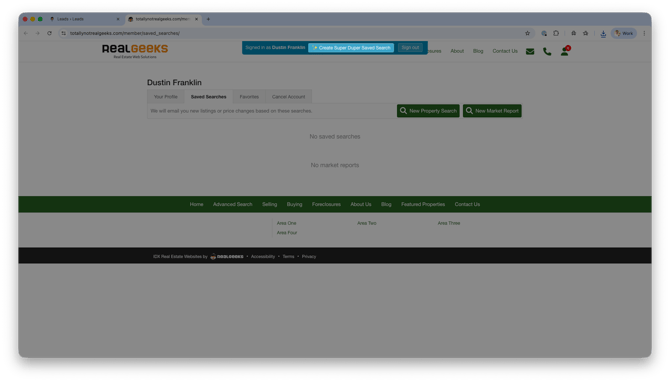
AI Search introduces a new way to create agent-only saved searches in the CRM. When logged in as a lead, you can use Create Super Duper Saved Search to build unique searches that send compelling property alerts and bring leads back to your website.
-
Create detailed searches using natural language
-
Capture specific client needs more accurately
-
Build searches faster without manual filtering
These searches power more relevant property alerts for your leads.
Website: Custom Content Pages
AI Search is also available when creating website pages.
-
Generate property groups for niche content
-
Create SEO-focused pages more easily
-
Showcase specific inventory based on search intent
What It Does
AI Search replaces manual filter-building with a natural language workflow.
-
Natural language input
-
Automatic filter matching
-
Zero-result handling with intelligent adjustments
-
Transparency when criteria cannot be matched
-
Live listing preview before saving
How It Works
Website: Create or Edit a Page Search
-
Open your website editor by adding /admin to the end of your website address (for example www.yourwebsite.com/admin)
-
Open your Content, Area, or Home page or create a new page
-
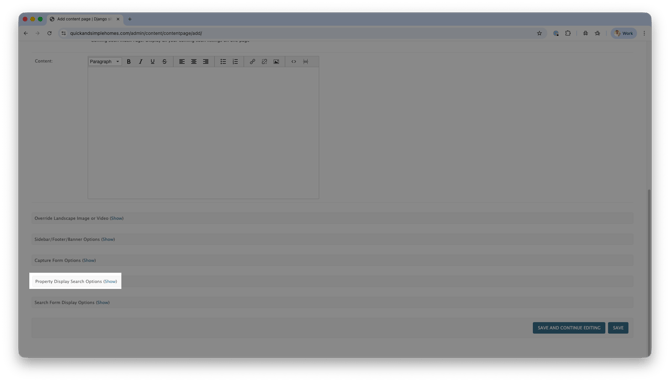
Click Show next to Property Display Search Options
-
Click Create Search /or Edit Search if listings are currently displayed on the page
-
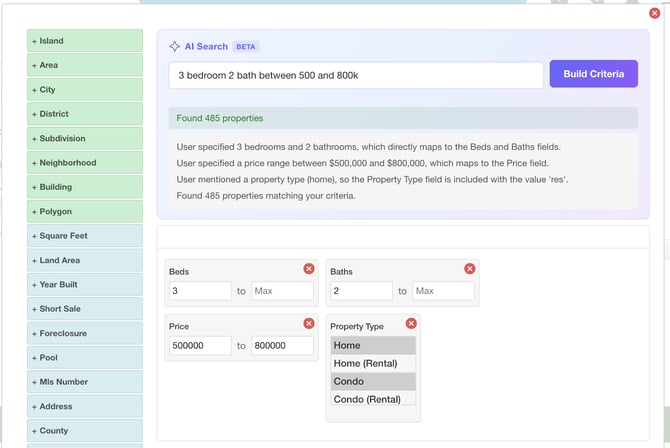
Enter your AI Description
-
Click Build Criteria
CRM: Super Duper Saved Search
-
Open the lead profile in the CRM
-
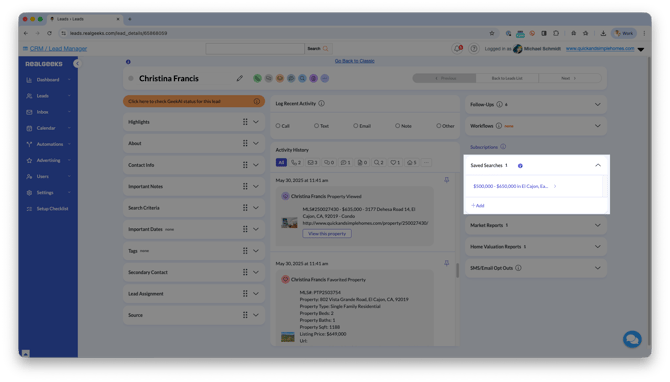
Click Saved Searches, then select + Add
-
Click Create Super Duper Saved Search
-
Enter your AI Description
-
Click Build Criteria
What happens next:
-
AI interprets the request and selects the correct filters
-
The system builds and runs the search in real time
-
Matching listings are displayed in a live preview
If no results are found:
-
The system attempts up to two adjustments
-
The core intent of the search is preserved
-
You are shown what was changed and why
Once confirmed, you can save the search and begin generating property alerts.
Beta Details & Availability
-
Scheduled for global release on March 23, 2026
-
Currently in beta; results may occasionally be imperfect
Important
-
AI Search does not replace existing workflows
-
All manual search tools remain available
-
This is an additional option, not a replacement
At launch, AI Search is available for:
-
CRM saved search creation
-
Website page creation