.svg)
Your Google Business Profile (business.google.com) helps you get found when buyers and sellers search in your area. It’s often the first impression people have of your business and is a key driver of calls, clicks, and new leads.
When set up and maintained properly, it works alongside your website and CRM to turn local searches into real conversations.
Need to Know
-
Create a Google Business profile to have your business shown in Google Searches and Maps
-
Always include your website and contact details so people can reach you directly from Google. Make it as simple as possible for leads to get in touch.
-
A Google Business profile that is consistently updated is a big green flag for Google, and can improve your website's SEO
-
Reviews directly impact how often your business appears on Google, so regularly encourage happy clients to leave a positive review
Table of Contents
What is a Google Business Profile?
A Google Business Profile is a free listing that displays your business in Google Search and Google Maps. It shows key details like your business name, phone number, website, hours, reviews, photos, and recent posts.
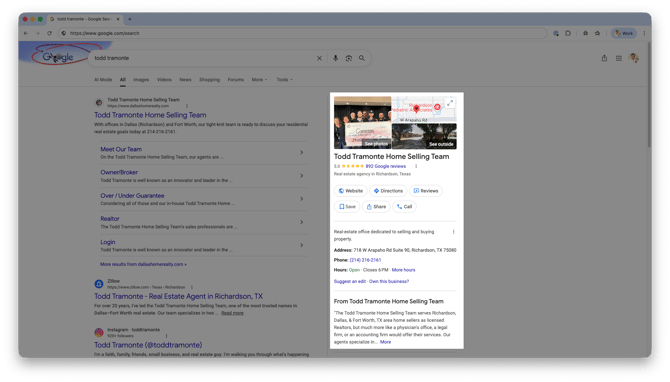 When someone searches for a real estate agent, your profile can appear alongside map results, giving people a quick way to learn about you and contact you. Think of it as your digital storefront for local search that is built to capture attention and turn it into action.
Why It Matters for Agents
Your profile puts you in front of people who are actively looking for an agent in your area.
-
Builds trust with reviews, photos, and activity
-
Increases visibility in local search and Maps
-
Generates calls, messages, and inquiries
-
Drives visitors to your Real Geeks site to search homes and become leads
-
Creates another path for buyers and sellers to discover your business online
How to Create a Free Google Business Profile
Guided Demo
Click the button below to view an interactive walkthrough of how to create a Google Business Profile from scratch
-
Go to business.google.com and click Start Now
-
Enter your business name
-
Choose Service Business as your business type
-
Select Real Estate Agent as your primary category
-
Add the cities or areas you serve
-
Enter your contact information, including your address, for verification and to appear on Google Maps
-
Select your business services so Google knows which specialties to show you for
-
Set your business hours
-
Write a clear business description
-
Upload business-related photos and images
Top Optimization Tips
Use Your Exact Business Name
Use your real or brokerage-approved business name so Google can confidently match your profile across the web.
-
✅ Correct: Jane Smith Realty
-
❌ Incorrect: Jane Smith Top Realtor in Dallas
Why it matters:
Consistent naming across your website and directories builds trust with Google and improves your chances of showing up in search.
Choose the Right Category
Always select the "Real Estate Agent" category so Google recognizes that you're a real estate agent.
-
Primary: Real Estate Agent
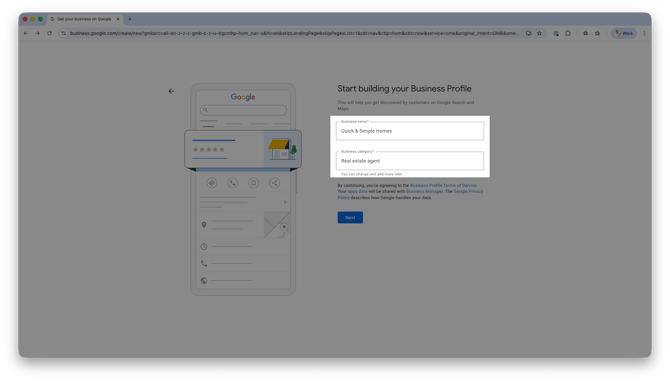
For your services, highlight just a few services you're an expert at. Are you a Buying (or Seller) agent service? Appraisals? New Construction?
Why it matters:
Your primary category is one of the biggest factors in how and when your profile appears in local search.
Complete Your Profile
Fill out every section so your profile looks active, professional, and easy to contact, making it simple for potential clients to understand who you are and how to reach you.
-
Business description
-
Service areas
-
Business hours
-
Website link (your Real Geeks site)
-
Contact or appointment link
Why it matters:
The more details you add, the easier it is for buyers and sellers to contact you, trust you, and see you as an established local pro, and it sends Google stronger signals to rank you higher in local search.
Add Photos and Video
Upload high-quality, real-life photos to your Business profile that shows who you are and how you work in your market.
-
Professional headshots
-
Team photos
-
Client closing photos
-
Open house setups
-
Local neighborhood highlights
-
Community involvement or events
-
Behind-the-scenes of your day-to-day work
-
Property tours or quick video walkthroughs
-
“Meet your agent” intro videos
Why it matters:
Visual content builds familiarity and trust, and profiles with consistent photo updates get more views and engagement.
Write a Clear Description
Write a natural, easy-to-read description that explains who you help and where you work.
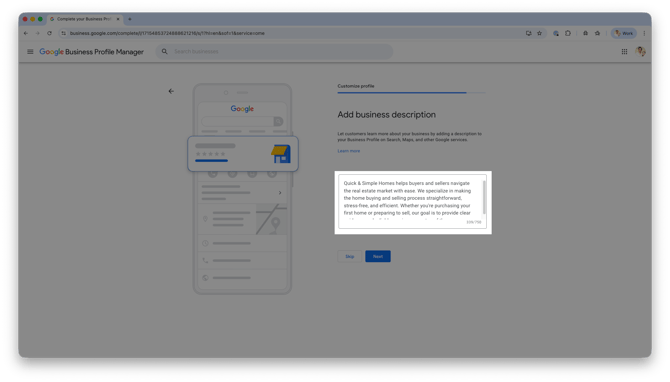
In your description, include:
- Markets you work out of
- Types of clients you work with (buyer, seller, investors, etc...)
- specialties/niches (luxury homes, new construction, relocation, etc...)
- What makes you unique (local expertise, communication style, years of experience, etc...)
I help buyers, sellers, and first-time homebuyers in Austin, Round Rock, and Cedar Park navigate the market with confidence. I specialize in relocation, new construction, and single-family homes, and I’m known for clear communication, local expertise, and a straightforward approach.
Why it Matters:
A stronger description helps potential clients quickly understand who you help, where you work, and what makes you different. It also gives Google more context about your business, which can improve your visibility in relevant local searches.
Always Respond to Reviews
Consistently collect reviews in your Google Business profile and respond to each one to build credibility.
-
Ask every happy client to leave you a review
-
Use a direct link or QR code to your Google Business profile to leave a review
-
Reply to every review:
- Example: Thank you for trusting me to help you buy your first home in Austin. I’m glad we found the perfect fit for you.
Why it matters:
Reviews are a major ranking factor and a huge signal to potential clients when choosing an agent. A strong volume of positive reviews builds instant credibility and can be the deciding factor between you and another agent.
Post Weekly Updates with Google Business Posts
Use Google Business Profile posts to regularly share updates and show Google that your business is active.
-
New listings
-
Open houses
-
Buyer or seller tips
-
Market updates
Example:
Just listed in North Austin. 3 bed, 2 bath home with a pool. Click to learn more.
Why it matters:
Posting regularly signals to Google that your profile is active and relevant, which can help you appear more often in local search results and Google Maps.
Enable Messaging
Turn on messaging in your Google Business Profile so leads can contact you instantly from your profile, making it easy for potential clients to reach you the moment they are interested.
-
Enable chat in settings
-
Respond quickly to new messages
-
Treat messages like real-time leads that need immediate attention
Why it matters:
Fast responses improve trust, show professionalism, and increase your chances of turning quick inquiries into real conversations and appointments.
Consider Google Local Service Ads
If you're interested in running Google Local Service Ads, you'll need a Google Business Profile before you can get started.
- Complete and verify your profile first
- Maintain strong reviews and accurate business information
- Keep your profile active with updates and photos
Why it matters:
Google Business Profile is required for Local Service Ads, which can place your business at the top of Google search results and generate additional lead opportunities from people actively searching for real estate services.
Frequently Asked Questions
-
What is the main benefit?
More visibility in local search and more inbound leads, meaning you are more likely to be discovered by buyers and sellers right when they are looking for an agent. -
Do I need a website?
Yes, and you already have one through Real Geeks. When someone discovers you through Google Search or Maps, your website gives them a place to search homes, learn more about your services, and contact you directly.
Every visitor who clicks from your profile to your website is a potential lead, making this one of the easiest ways to generate free traffic and lead opportunities. -
How often should I update?
Weekly posts and periodic photo updates help keep your profile active and signal to Google that your business is current and engaged. -
Are reviews important?
Yes, they strongly impact rankings and trust, and they often influence whether a potential client chooses you over another agent.
Need Help?
- Call us at 844-311-4969 (Mon–Fri, 8 AM–8 PM CST)
- Email support@realgeeks.com
- View our Live Events page for free coaching and training.
- Join the Real Geeks Mastermind Group on Facebook for peer tips and best practices