.svg)
The Design & Print Studio, powered by Breakthrough Broker, is your marketing center inside Real Geeks. It gives you access to hundreds of professionally designed templates that help you promote listings, build your brand, stay in touch with past clients, and generate new business.
Customize each template with your own branding, then choose how you'd like to use it:
-
Print materials for yourself
-
Mail them directly to leads in your CRM
-
Target new neighborhoods with Geographic Farming
-
Download digital assets to share online.
Need to Know
-
Included with every Real Geeks account.
-
There is no additional cost to use the Design & Print Studio.
- You only pay for the materials you print or mail.
-
Billing is handled separately through Breakthrough Broker.
-
Digital marketing assets can be downloaded for free at any time
-
Most print orders are produced in approximately 3 business days.
- Printing and mailing are currently only available in the United States. Canadian clients can create and download digital marketing materials.
Table of Contents
Access the Design & Print Studio
To access the Design & Print Studio:
-
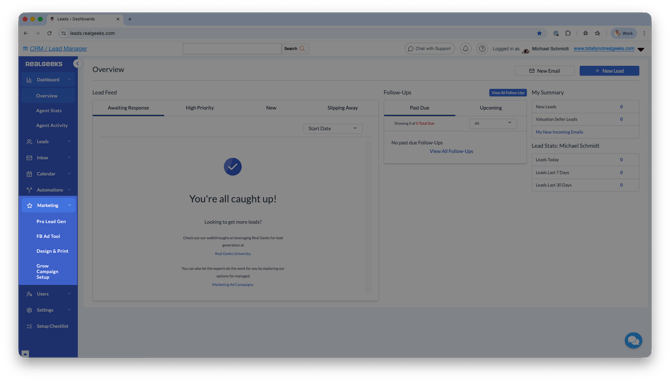
In the Real Geeks CRM, click Marketing.
-
Select Design & Print.
🔎 Looking for a specific marketing template?
Browse the Design & Print Studio Template Directory to see available marketing resources and quickly find the type of design you need.
From here you can browse templates, customize marketing materials, and choose how you'd like to distribute them.
Create Your Marketing Materials
Creating professional marketing materials only takes a few minutes.
-
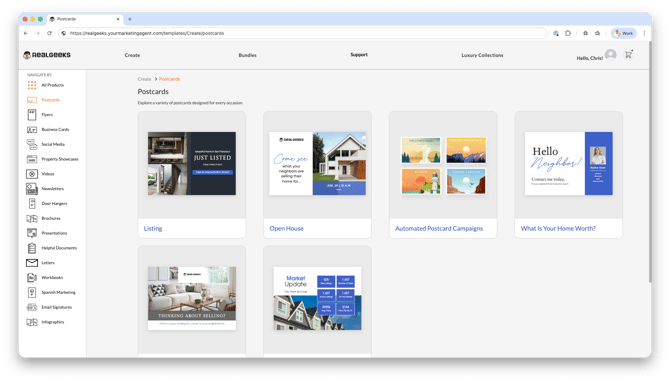
Choose the type of marketing resource you'd like to create.
-
Browse and select a professionally designed template.
-
Customize the template with your branding, colors, messaging, and images.
-
Preview your finished design.
-
Choose how you'd like to distribute it.
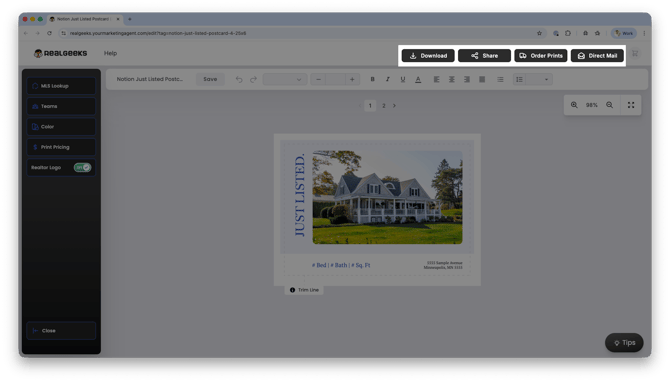
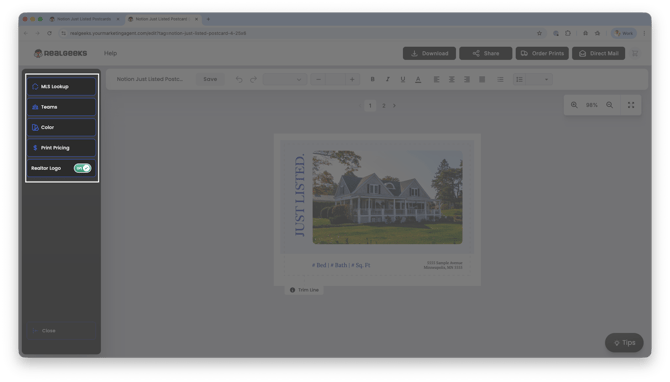
Many templates also support MLS Lookup, allowing you to search by MLS number and automatically populate listing information and photos.
The editor also includes several tools to help personalize your designs:
- Add your own images to any design, including additional logos, QR codes, and custom graphics.
- Move, resize, and layer images anywhere on your template for greater design flexibility.
- Browse MLS photos, uploaded images, logos, and headshots from the Image Drawer without leaving the editor.
- Save uploaded images to quickly reuse them across future marketing materials.
- Brand materials for a single agent, two agents, or your entire team.
- Apply your own colors and logo.
- Save designs to reuse later.
- Save mailing lists for future campaigns.
Creating professional marketing materials only takes a few minutes.
-
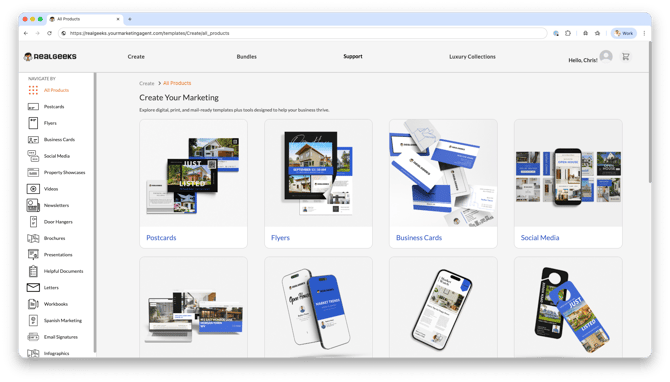
Select your Marketing Material
-
Browse and select a professionally designed template.
-
Customize the template with your branding, colors, messaging, and images.
-
Preview your finished design.
-
Choose how you'd like to distribute it.
Many templates also include an MLS Lookup feature that automatically fills in listing information and photos.
You can also:
- A single agent
- Two agents
- Your entire team
Download Digital Marketing Assets
The Design & Print Studio isn't just for printed materials.
Many templates can be downloaded at no additional cost, making it easy to create professional marketing for your website, email, and social media.
Available digital resources include:
- Social Media Graphics
- Property Showcase Assets
- Marketing Videos
- Email Signatures
- Buyer & Seller Presentations
- Helpful Documents
- Workbooks
Customize your design, then click Download instead of placing a print order.
This is a great way to create consistent branding across your online marketing without paying for printing.
Marketing Resources & Pricing
The Design & Print Studio includes a variety of professionally designed marketing resources to help you build your business.
Pricing varies based on the resource, quantity ordered, and delivery method.
Postcards
Great for prospecting, neighborhood farming, new listings, open houses, and staying in touch with your database.
Delivery Options
- Print & Ship
- Direct Mail
- Geographic Farming
Print & Ship Pricing
Small Postcards (4.25" × 6")
- 25–49: $0.58
- 50–99: $0.42
- 100–199: $0.28
- 200–299: $0.26
- 300–499: $0.25
- 500–999: $0.23
Large Postcards (5.5" × 8.5")
- 25–49: $0.84
- 50–99: $0.66
- 100–199: $0.55
- 200–299: $0.54
- 300–499: $0.42
- 500–999: $0.50
XL Postcards (11" × 5.5")
- 25–49: $0.95
- 50–99: $0.74
- 100–249: $0.65
- 250–499: $0.61
- 500–999: $0.60
Direct Mail Pricing
- Small: First Class $0.83 | Standard/Bulk $0.80
- Large: First Class $0.95 | Standard/Bulk $0.85
- XL: First Class $1.13 | Standard/Bulk $0.92
Flyers
Promote listings, advertise open houses, and create professional handouts.
Delivery Options
- Print & Ship
- Direct Mail
Print & Ship Pricing
- Print & Ship: From $0.50 each
- Direct Mail: From $1.21 each
Brochures
Perfect for buyer consultations, listing presentations, and showcasing your services.
Delivery Options
- Print & Ship
Print & Ship Pricing
- From $1.85 each
Door Hangers
Great for neighborhood prospecting and geographic farming.
Delivery Options
- Print & Ship
Print & Ship Pricing
- From $0.46 each
Business Cards
Share your contact information and reinforce your professional brand.
Delivery Options
- Print & Ship
Print & Ship Pricing
- 100 cards: $33
Notecards
Create personalized thank-you notes and client correspondence.
Delivery Options
- Print & Ship
Print & Ship Pricing
- 100 cards: $82
Booklets
Provide detailed buyer and seller guides.
Delivery Options
- Print & Ship
Print & Ship Pricing
- 25 booklets: $109
Digital Marketing Resources
Create digital assets for your business, including:
- Social Media Assets
- Property Showcase Assets
- Videos
- Email Signatures
These resources can be downloaded for free after customization and do not require printing.
Additional Marketing Resources
The Design & Print Studio also includes:
- Buyer Presentations
- Listing Presentations
- Newsletters
- Letters
- Helpful Documents
- Workbooks
- Spanish Marketing Materials
Pricing and delivery options vary by product and quantity.
Start with Bundles
Not sure where to begin?
Bundles organize templates around a specific marketing goal, making it easy to find everything you need for a campaign.
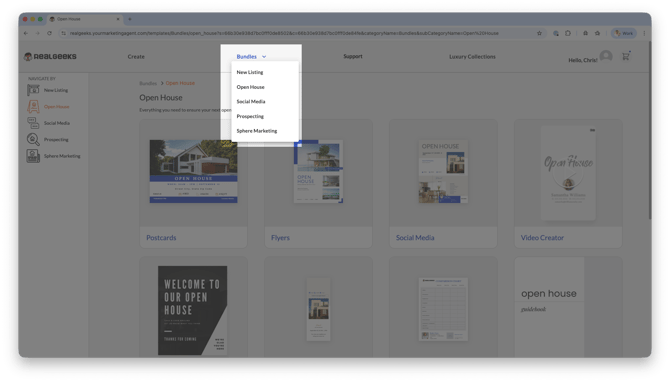
Available bundles include:
- New Listing
- Open House
- Prospecting
- Social Media
- Sphere Marketing
For example, the New Listing bundle includes matching postcards, flyers, social media graphics, videos, and other resources designed specifically to promote a listing.
To browse bundles:
- Click Create.
- Select Bundles.
- Choose the campaign you'd like to create.
Saved Designs
Don't recreate the same marketing piece every time.
Save completed designs so you can quickly edit, duplicate, or reorder them later.
Perfect for:
-
Monthly newsletters
-
Open houses
-
Just Listed campaigns
-
Holiday promotions
-
Seasonal marketing
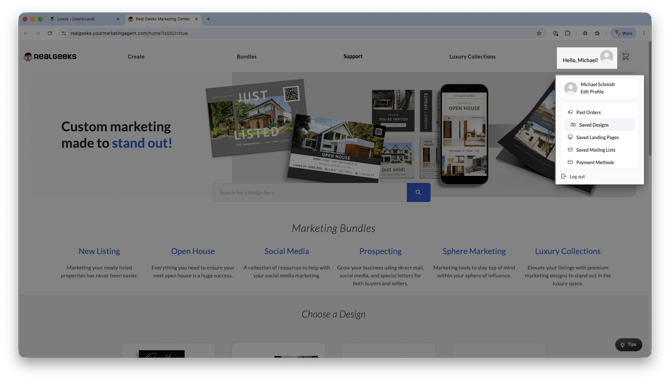
To access your saved designs:
-
Click your Profile.
-
Select Saved Designs.
Save Mailing Lists
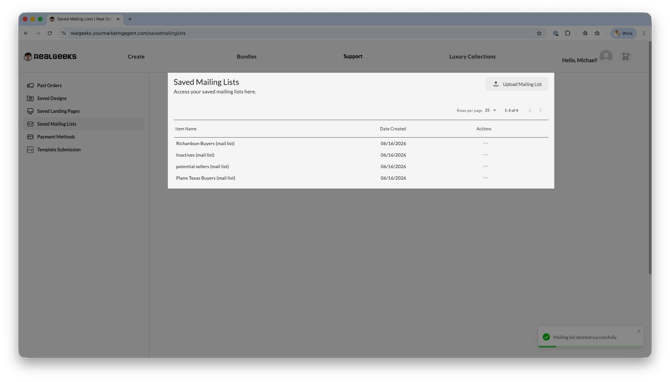
If you regularly market to the same audience, save your mailing list to quickly launch future campaigns.
 Great for:
- Past clients
- Sphere of influence
- Buyer leads
- Seller leads
- Geographic farming areas
To save or reuse a mailing list:
-
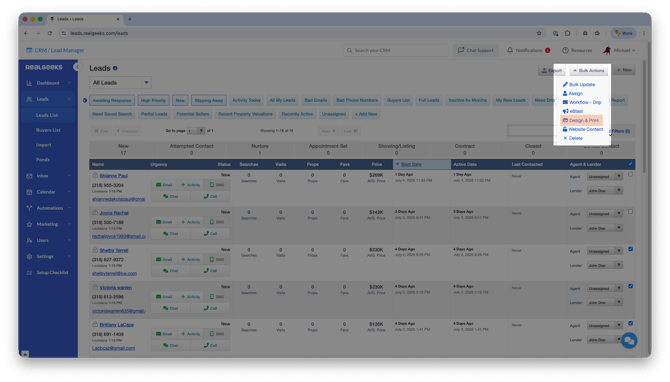
Select a batch of leads (with advanced search filters or with the lead checkboxes)
-
Click Bulk Actions, then select Design & Print
-
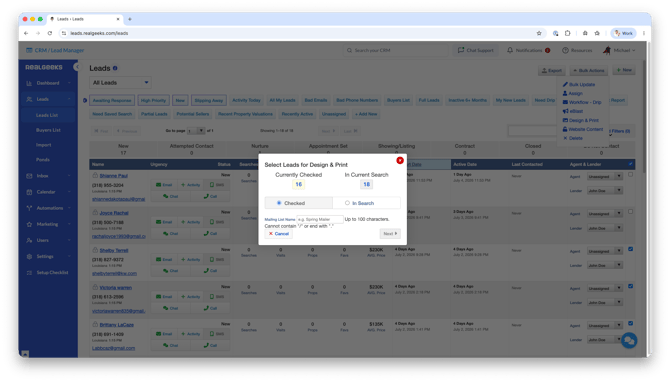
Next to Mailing List Name, enter a recognizable name for this list of contacts
-
Click Next
Select Go to Design & Print Studio to visit the design page and initiate your design customizations.
After completing the customizations to your design, select your Direct Mail to access your mailing options. Select the option to Mail to a List.
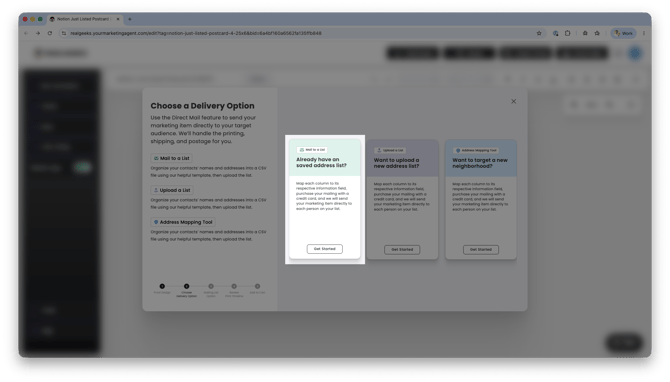
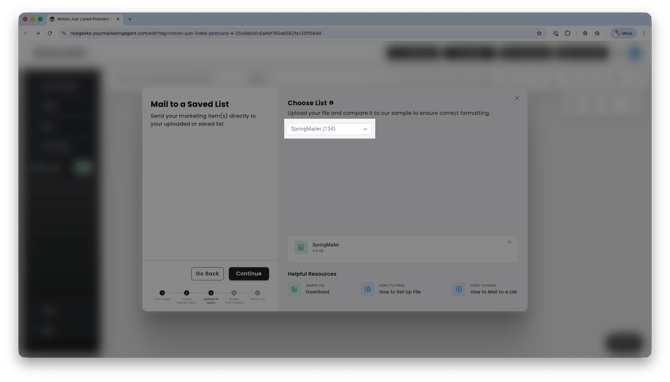
Your new custom mailing list from the CRM will be available to select under the Choose a List method.
This is especially helpful if you regularly market to:
- Past clients
- Your sphere of influence
- Buyer leads
- Seller leads
Automated Campaigns
Some newsletters and postcard campaigns can be scheduled to send automatically.
Automated campaigns help you stay consistently in front of your audience without manually creating a new campaign every month.
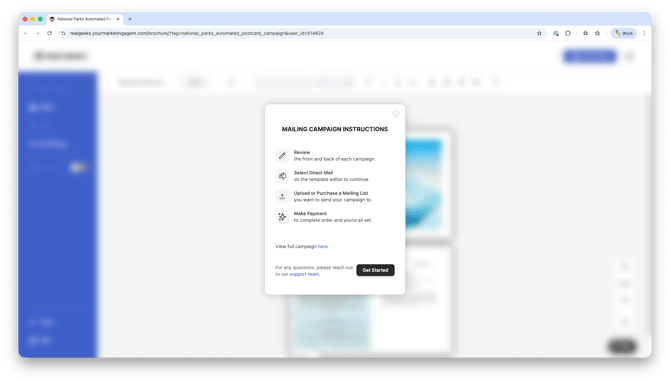
To start an automated campaign:
- Select a template that supports Automated Campaigns.
- Choose your mailing audience.
- Complete checkout.
Campaigns begin on the next available mailing date and follow a predefined schedule managed by Breakthrough Broker.
View the current campaign schedules:
https://realgeeks.yourmarketingagent.com/faqs
Automated Campaign Pricing
Newsletter Campaign (12 mailers/year):
-
$22.92 per recipient (for 50–99 recipients)
-
Example: $22.92 x 50 = $1,146.00 for the full year (postage not included)
-
Postcard Campaign (4 mailers/year):
-
$4.48 per recipient (for 50–99 recipients)
-
Example: $4.48 x 50 = $224.00 for the full year (postage not included)
-
Postcard Campaign (6 mailers/year):
-
$6.72 per recipient (for 50–99 recipients)
-
Example: $6.72 x 50 = $336.00 for the full year (postage not included)
-
Add a Payment Method
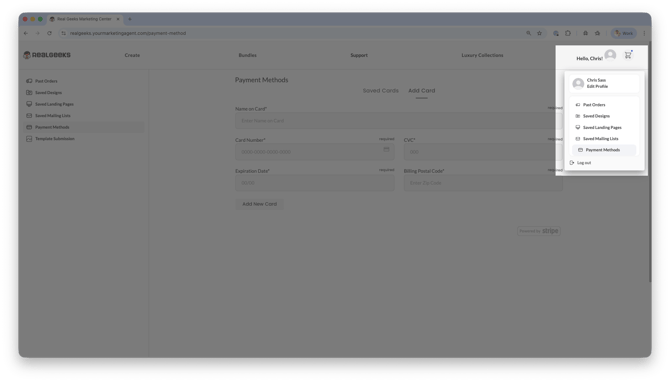
Before placing an order, you’ll need to add a payment method inside the Design & Print Studio.
To add a payment method:
-
In the Design & Print tool, click on your Profile Icon
-
Click Payment Methods
-
Enter your billing details
-
Click Add New Card
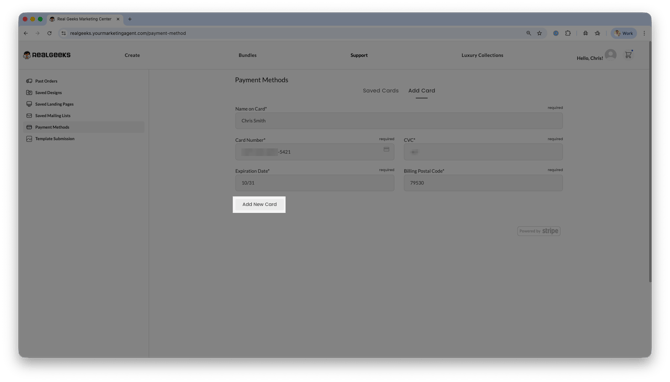
Once your payment method is saved, you can complete checkout for print or direct mail orders.
Frequently Asked Questions
-
Can I use the Design & Print Studio in Canada?
Yes, but printing and mailing are currently only available in the United States.
Canadian clients can use the Design & Print Studio to customize and download digital marketing materials, including designs created with their Canadian listings.
Canadian clients currently cannot:
-
Mail materials to CRM contacts
-
Purchase geographic farming lists
-
Order printed materials for delivery
-
-
Do I have to pay extra to use Design & Print Studio?
No, there is no cost to use the Design & Print Studio. You only pay for printing and mailing when you place an order. -
How long does it take to receive printed materials?
Most orders are produced and shipped within approximately 3 business days, depending on the product and delivery method. -
Can I send materials directly to my leads?
Yes, you can select contacts from your CRM and send marketing materials directly to them using direct mail options. -
Can I customize the designs?
Yes, most templates allow you to edit text, branding, and images to match your business and market. - Why do some mailing lists show recipients as "Current Resident"?
If a contact doesn't have a name in your Real Geeks CRM, the Design & Print Studio automatically uses "Current Resident" when creating the mailing list. This ensures those contacts can still be included in your mailing campaign. This only applies within the Design & Print Studio for mailing purposes and does not change the contact's name in your Real Geeks CRM. -
Can I create a marketing piece from scratch?
No, all materials are created using the available template library. You’ll choose a template and customize it, rather than building a design from a blank canvas. -
When does my automated campaign start?
Automated campaigns begin with the next scheduled mailing date after your order is placed. You don’t need to manage each send. For full timelines, see the Design & Print Studio FAQ. -
What is the schedule for automated newsletters?
Newsletter campaigns send monthly on preset dates. Your campaign starts on the next send date and continues automatically. For full timelines, see the Design & Print Studio FAQ. -
What are the schedules for automated postcard campaigns?
Postcard campaigns use themed, preset schedules with fixed send dates. Your campaign starts on the next available date and follows that schedule. For full timelines, see the Design & Print Studio FAQ.
Need Help?
-
Call us at 844-311-4969 (Mon–Fri, 8 AM–8 PM CST)
-
Email support@realgeeks.com
-
View our Live Events page for free coaching and training.
-
Join the Real Geeks Mastermind Group on Facebook for peer tips and best practices