.svg)
Message templates in the Real Geeks CRM help you communicate faster, stay consistent, and personalize messages at scale. Instead of rewriting the same messages, you can use pre-built templates across email, text, and live chat to respond quickly and start more conversations with your leads.
Whether you’re following up, answering questions, or engaging a new lead, templates give you a reliable starting point that you can customize in seconds.
Need to Know
-
Message templates are reusable drafts for email, text, live chat, and automated sign-up responses
-
Templates help agents respond faster and stay consistent across teams
-
Most templates can be edited before sending to match the situation
-
Templates support merge fields to personalize messages automatically
Table of Contents
What Are Message Templates?
Message templates are pre-written messages you create in advance so you don’t have to start from scratch every time you contact a lead.
They help you:
- Respond quickly in high-frequency situations
- Keep communication consistent across your business
- Reduce time spent writing repetitive messages
- Personalize outreach without slowing down
Instead of thinking about what to say each time, you can focus on how to move the conversation forward.
Where to Manage Your Templates
All message templates are managed from the lead manager.
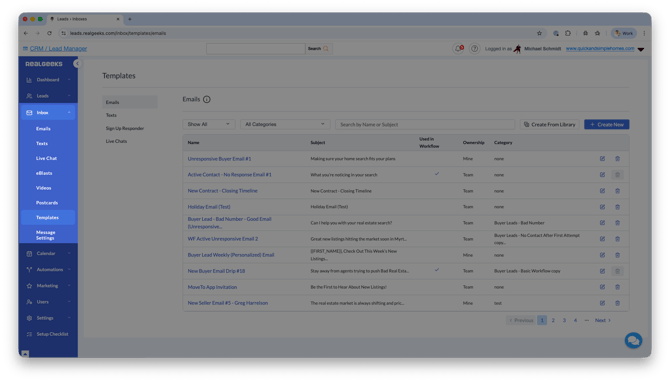
To access your templates:
From here, you can create, edit, and organize templates for email, text, live chat, and sign-up responder messages.
Click Create New to build your own template, or select Library to quickly use and customize pre-made messages.
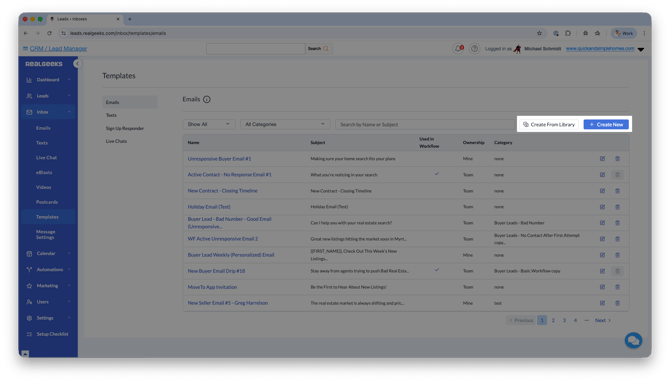
Email Templates
Email templates are best for more detailed, value-driven communication throughout the client journey.
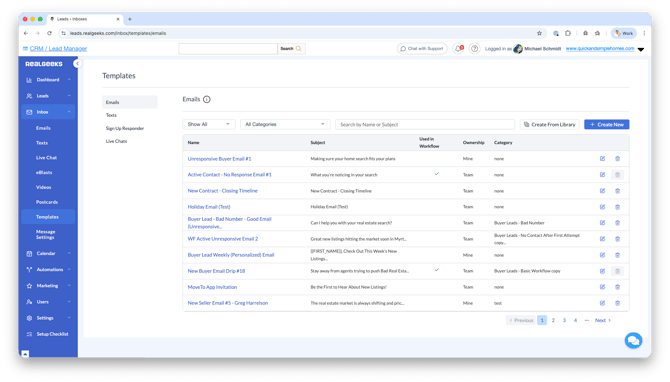
You can use them for:
- New lead introductions
- Property recommendations
- Follow-ups and check-ins
- Ongoing client communication
Email templates can be created from scratch or customized from the Template Library. They support rich formatting, including images, videos, attachments, and styled text, allowing you to deliver more engaging and informative messages.
They can also be used inside workflows to automate follow-up emails and keep communication running consistently in the background.
Example scenarios:
- Sending a list of homes with context and next steps
- Following up after a showing with helpful insights
- Checking in with a lead who has gone quiet
Text Templates
Text templates are designed for speed and efficiency in high-frequency communication.
They are commonly used for:
- Quick follow-ups
- Appointment reminders
- Open house invites
- Re-engagement messages
You can create templates from scratch or use pre-built options from the Template Library. Templates can be used for one-off messages or added to workflows for automated texting.
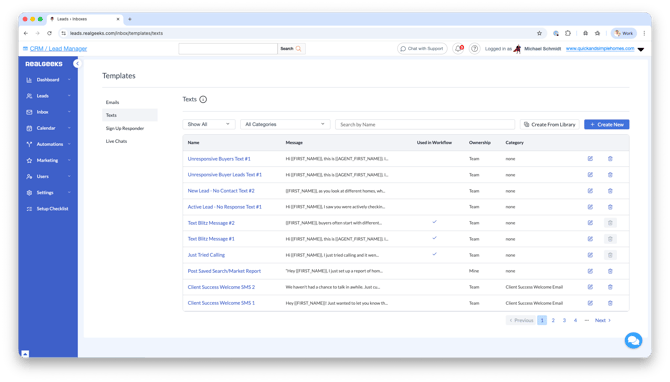
Text templates support merge fields like {{FIRST_NAME}} and can be edited before sending, so messages stay personal while saving time. You can also include videos to increase engagement when needed.
Templates can be organized into categories and shared with your team to keep communication consistent.
Example scenarios:
- “Hey , just checking in. Are you still looking in [AREA]?”
- “Quick reminder about our appointment tomorrow. Let me know if anything changes.”
Live Chat Templates
Live chat templates allow you to engage leads in real time while they are actively browsing your website.
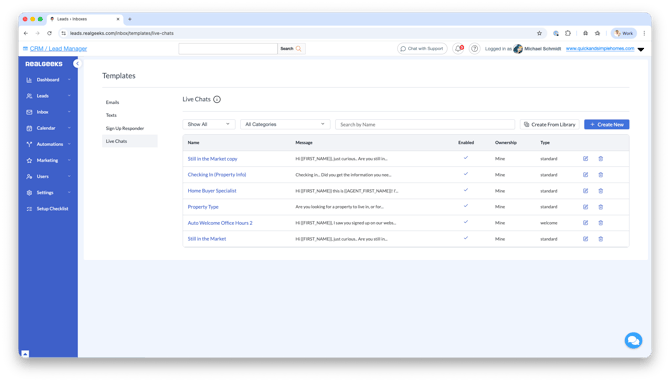
This is one of the fastest ways to start a conversation and guide a lead toward next steps.
You can create templates for:
- Messages you send during a live conversation
- Automated welcome messages that start chats instantly
- Unavailable responses that reply when you are offline
These templates help ensure every lead gets a response, whether you are available or not.
Live chat templates are best used as conversation starters. You can adjust them in real time to match the situation and keep the interaction natural.
Example scenarios:
- Welcoming a visitor and asking what they are looking for
- Offering help based on the properties they are viewing
- Prompting a lead to share more details so you can follow up
Sign-Up Responder Texts
Sign-up responder texts are automated messages sent immediately when a new lead registers on your website.
They help you:
- Meet speed-to-lead expectations
- Start conversations right away
- Set the tone for future communication
You can customize these messages based on lead source, allowing you to tailor your outreach depending on how the lead found you.
These messages work best when they are simple, conversational, and focused on starting a response.
Example scenario:
- “Hey , saw you just signed up. What caught your eye so far?”
Best Practices for Using Templates
- Create templates for your most common conversations to save time daily
- Use merge fields to personalize messages at scale
- Keep messages conversational and focused on starting a response
- Ask simple questions to encourage engagement
- Build multiple variations so your outreach feels natural
- Align templates across your team for consistent messaging
Templates work best when they support real conversations. Use them as a starting point, not a script.
Need Help?
-
Call us at 844-311-4969 (Mon–Fri, 8 AM–8 PM CST)
-
Email support@realgeeks.com
-
View our Live Events page for free coaching and training.
-
Join the Real Geeks Mastermind Group on Facebook for peer tips and best practices