.svg)
Email deliverability is your ability to successfully send an email to a lead’s inbox.
In simple terms: you send the email and they receive it.
Sometimes emails don’t make it through though, even when everything looks fine on your end. This happens because email providers like Google and Microsoft use spam filters to protect inboxes. These systems typically work well, but they can occasionally flag legitimate emails.
This guide focuses on quick, practical ways to avoid common spam triggers and improve inbox placement.
Table of Contents
Tip #1: Make Sure the Lead Has Not Opted Out of Email Communication
Before emailing a lead, confirm they have not opted out of that type of email. If a lead has said they do not want certain emails, do not send them. This is non‑negotiable.
Emailing opted‑out leads can hurt deliverability and lead to broader issues beyond spam filtering.
You can check opt‑outs in two ways:
-
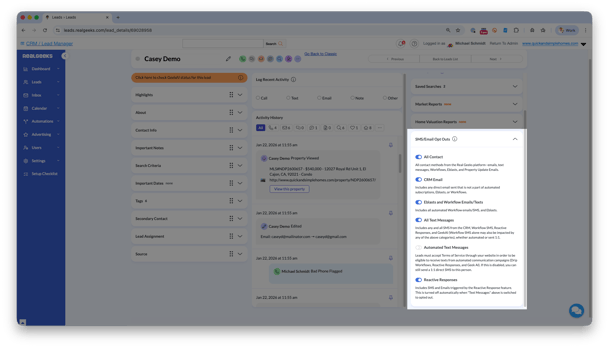
Individual: Open the lead profile and review SMS / Email Opt‑Outs (bottom‑right)
-
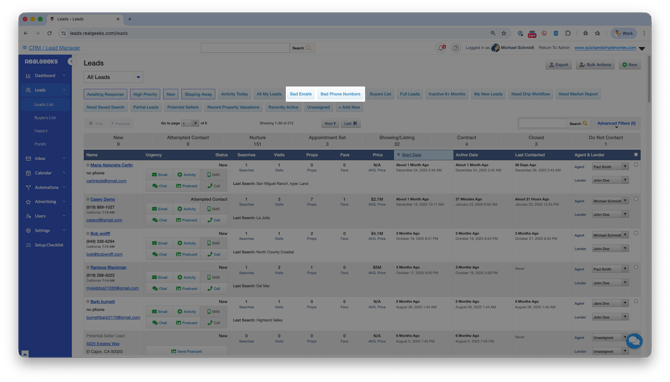
Bulk: Use Advanced Filters to review opt‑in and opt‑out status across multiple leads
The SMS / Email Opt‑Outs menu shows exactly which messages a lead has opted out of, such as mass emails, direct emails, or property updates.
Important
A lead may opt out of mass or automated emails but still allow direct, one‑to‑one emails. In those cases, email them directly instead of using automation.
If a lead has requested no contact at all, do not email them.
Tip #2: Prioritize Engagement Over Volume
Email deliverability is driven by engagement. What matters most is how people interact with your emails.
When leads open, click, reply, or return to your website, email providers see that as positive signals. Engagement improves your sender reputation, which directly impacts whether future emails reach the inbox.
Focus on intentional communication that drives action.
Best Practices:
-
Use the Advanced Filters in your CRM to group similar leads by interests, timeframe, or activity
-
Send content that matches what those leads actually care about
-
Encourage clicks, replies, or visits back to your website by including at least one relevant link. This could be a custom search you wanted to share, a property you think they'd like, or a market report of their area
Fewer emails with strong engagement outperform higher‑volume sends every time.
Tip #3: Keep Emails Simple and Light
Emails with large file sizes, too many images, or excessive links are more likely to be filtered.
Spam filters evaluate the overall file size of an email. The heavier the email, the higher the risk.
Think of your email like airport security. If your bag is too heavy, it gets stopped. Lighter emails move through faster.
Best practices:
-
Only use 1–2 images with small file sizes
-
Keep attachment file sizes small or avoid attachments
-
Use plain, readable text
Tip #4: Write Like a Real Person, Not a Robot
Spam filters and leads respond best to emails that sound human.
Overly sales‑focused language, aggressive phrasing, or heavy formatting can work against you. Clear, helpful, conversational emails build trust and improve deliverability.
Subject Lines
-
Keep under 50 characters
-
Personalize when possible using Real Geeks Merge Fields
-
Be clear, not hype‑driven
Email Body
-
Keep content concise and easy to scan
-
Include one clear next step or call to action
-
Only send content your lead actually wants
What to Avoid
-
ALL CAPS or excessive punctuation
-
Multiple font styles
-
Links to unfamiliar websites (stick to your site)
-
Link shorteners like bit.ly
-
Too many images or links
-
Spam‑heavy language like “free,” “act now,” or “limited time”
Tip #5: Send Bulk Emails in Smaller Batches
Real Geeks does not limit how many emails you can send, but industry best practices strongly favor sending mass emails to multiple smaller groups rather than one large bulk "blast." In this context, a "batch" simply means the group of leads you email at one time.
Sending too many emails at once increases the risk of spam filtering and lowers engagement.
Large, broad email blasts also tend to perform worse with leads. When messages are sent to more targeted groups, they feel more relevant and are more likely to be opened or clicked. Higher engagement helps protect your sender reputation and improves future inbox placement.
Best Practices:
- Emailing 100–200 leads per batch is typically the safest and most effective range. As a general rule, we recommend not sending to more than 300 leads at one time.
-
Use Advanced Filters in your CRM to group similar leads and send more targeted mass emails efficiently
Smaller, targeted batches perform better and protect deliverability.
Frequently Asked Questions
-
How many leads can I email at once or in a day?
Real Geeks does not have a technical sending limit. Best practice is to email 100–200 leads at a time, with 300 per batch as a general upper guideline. Smaller batches help protect deliverability and improve engagement. -
Why are my emails going to spam even if I’m following best practices?
Email providers evaluate engagement and sender reputation over time. Even with good habits, inbox placement can take some time to improve. Consistent opens, clicks, and replies are key. -
Do automated emails hurt deliverability compared to direct emails?
Automated emails work well when they are relevant to the lead. If engagement is low, sender reputation can suffer. More targeted or direct emails often perform better. -
Do clicks and replies really matter?
Yes. Clicks, replies, and website visits are strong positive signals for email providers. Higher engagement improves sender reputation and inbox placement. -
Should I stop emailing leads who never open emails?
Yes. You should stop email communication to protect deliverability. Instead, use calls, texts, or postcards to re‑engage the lead.
Need Help?
If you need help reviewing email settings, understanding opt‑outs, our team is here to support you.
-
Call us at 844‑311‑4969 (Mon–Fri, 8 AM–8 PM CST)
-
Email support@realgeeks.com
-
Visit Real Geeks University for free video courses
-
Join the Real Geeks Mastermind Group on Facebook for peer tips and best practices