.svg)
Admin Feature
This feature requires the account owner (or admin) to grant CRM Admin Permissions. If you don't see this option, contact your account owner to enable it for you.
Bulk lead assignment in the Real Geeks CRM lets you reassign multiple leads at once. You can assign leads to a single agent, distribute them through Round Robin to multiple agents, or place them into a Lead Pond for agents to claim. This helps keep your team organized and ensures leads are followed up with quickly.
Need to Know
-
You must have admin permission to manage Lead Assignment in the CRM
-
You can assign leads to a single agent, a Lead Pond, or Round Robin
-
Bulk Actions only apply to the leads currently selected or filtered
-
Use the notify setting to ensure your team knows when you assign contacts to them
Table of Contents
How to Assign Leads in Bulk
-
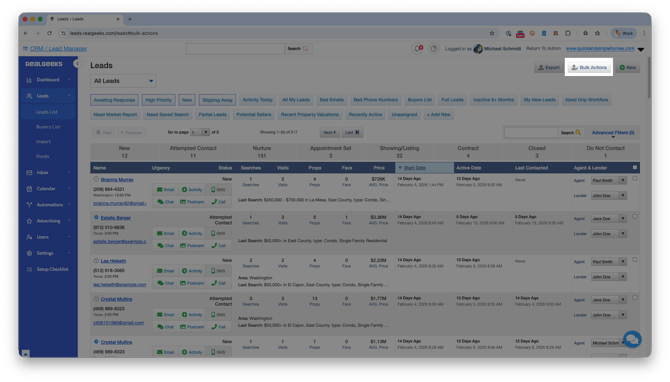
Go to the Leads List
-
Use Advanced Filters or manually select leads
-
Click Bulk Actions
-
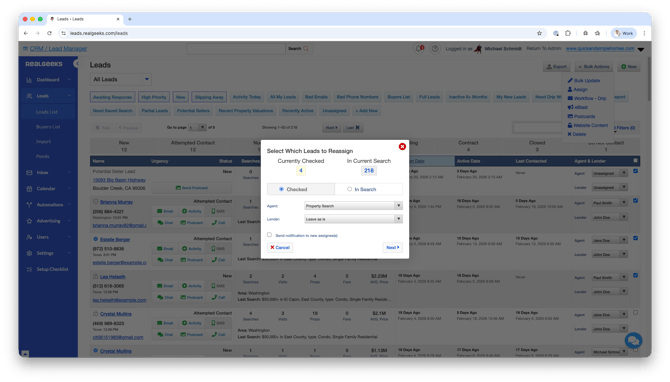
Choose Assign
-
Use the Agent menu to reassign the leads to:
-
A single agent
-
A Lead Pond
-
Round Robin
-
-
(Optional) Enable the Send notification to new assignee(s) to notify the new agent the lead's assigned to
-
Click Next
-
Confirm the Reassignment, then click Reassign
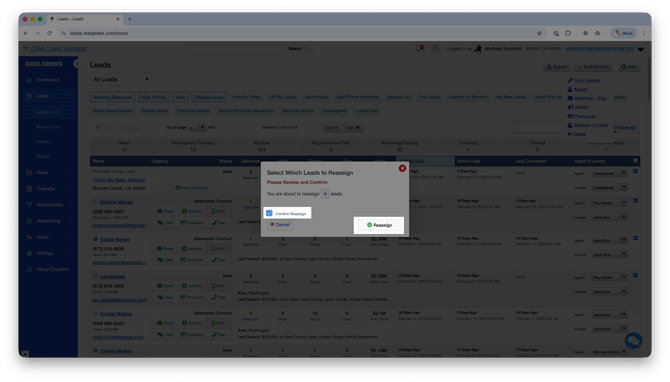
Once confirmed, the selected leads will immediately update with the new assignment.
Assignment Options Explained
When using Bulk Actions, you can assign leads to:
-
A single agent — Transfers ownership of all selected leads to one specific team member
-
A Lead Pond — Moves leads into a shared pond where eligible agents can claim them
-
Round Robin — Distributes leads evenly based on your Round Robin rules
Choose the option that best supports your team structure and response strategy. Using Lead Assignment strategically ensures faster follow-up and better conversion opportunities.
Frequently Asked Questions
-
Can I bulk assign all leads at once?
Yes. If you do not apply Advanced Filters or manually select leads, the action will apply to all leads currently displayed in your Leads List. -
Will the previous agent lose access to the leads?
Yes. Once reassigned, the new owner controls the lead unless your team permissions allow shared visibility. -
What is the difference between a Lead Pond and Round Robin?
A Lead Pond allows agents to claim leads manually, while Round Robin automatically distributes leads based on preset rules. -
Can I undo a bulk reassignment?
There is no automatic undo button, but you can repeat the bulk process to reassign the leads again if needed.
Need Help?
- Call us at 844-311-4969 (Mon–Fri, 8 AM–8 PM CST)
- Email support@realgeeks.com
- Visit Real Geeks University for free video courses
- Join the Real Geeks Mastermind Group on Facebook for peer tips and best practices