.svg)
Admin Feature
This feature requires the account owner (or admin) to grant CRM Admin Permissions. If you don't see this option, contact your account owner to enable it for you.
Idle Lead Reassignment helps ensure that no lead sits untouched in your CRM. It creates accountability by requiring agents to follow up within a set timeframe. If that does not happen, the system automatically marks the lead as idle and reassigns it based on your rules. This keeps opportunities moving and ensures every lead gets a real response.
Need to Know
-
Idle Lead Reassignment limits how long a lead can sit without agent contact before it’s reassigned to another agent in the CRM.
-
Only direct agent communication (email, text, or phone call) clears the idle status, not automated messages
-
Reassign leads directly to another agent, or place the contact in a Lead Pond to be claimed by the first available agent
-
Set Office Hours so the reassignment only occurs when agents are working
Table of Contents
What Is Idle Lead Reassignment and How It Works
Idle Lead Reassignment is a system that holds your team accountable for follow up and protects your leads from being missed.
When a new lead is assigned, the system starts a timer. If the assigned agent does not reach out within your set timeframe, the lead is marked as idle and automatically reassigned based on your rules.
For teams, this is critical. It removes guesswork and ensures:
-
Every lead gets a real contact attempt
-
No opportunity sits untouched in someone’s pipeline
-
Your fastest responders get more opportunities
At the end of the day, faster response times lead to more conversations, and more conversations lead to more closings.
How to Access Idle Lead Reassignment Settings
-
Go to your Lead Manager: leads.realgeeks.com
-
Click Users > then select Lead Assignment
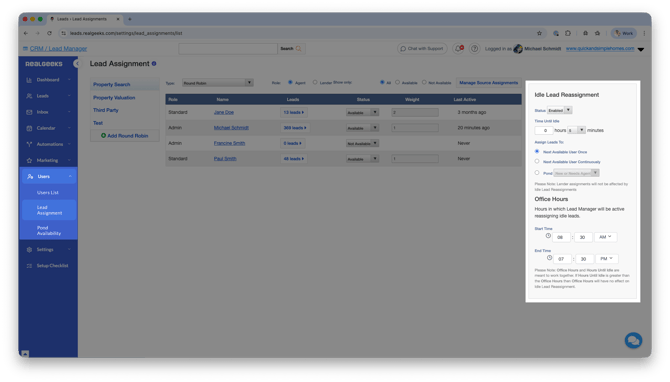 From here, you can control how long leads can sit and what happens when they are not worked.
Idle Lead Reassignment Settings Explained
This section breaks down the three core settings you will configure on the Idle Lead Reassignment page so you can control exactly how leads are handled.
Enable
Enable the tool to implement the reassignment tool. This means when a lead signs up, a countdown clock begins for the agent to make a direct attempt of communication.
To remove leads from idle reassignment, the agent can:
-
Call
-
Text
-
Email
-
Schedule a Follow Up
When enabling this tool for the first time, the user will be prompted with a reminder of the current time until the lead is considered "idle" and a lead count of all leads that will be affected.
 The Site Owner or Admin can click Review Leads to view this list and make sure the assigned agents are making an effort to talk with the lead before they will be reassigned.
Time to Idle
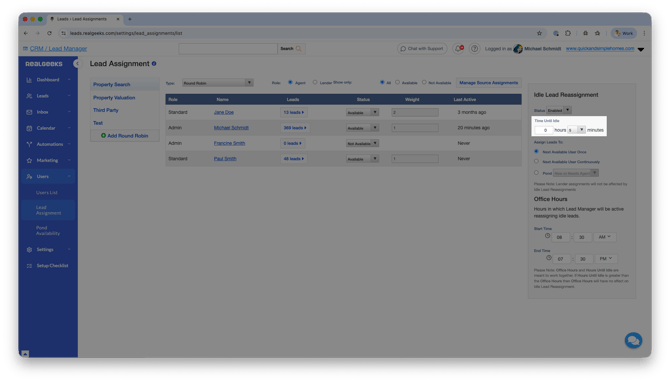
This setting controls how long an agent has to contact a lead before it is reassigned.
-
You set the timeframe (for example, 5 minutes, 30 minutes, or longer)
-
The timer starts as soon as the lead is assigned
-
If no direct contact is made, the lead becomes available for reassignment
For team leaders, this is where you set expectations. Shorter times create faster response habits and better conversion rates.
Assign Leads To
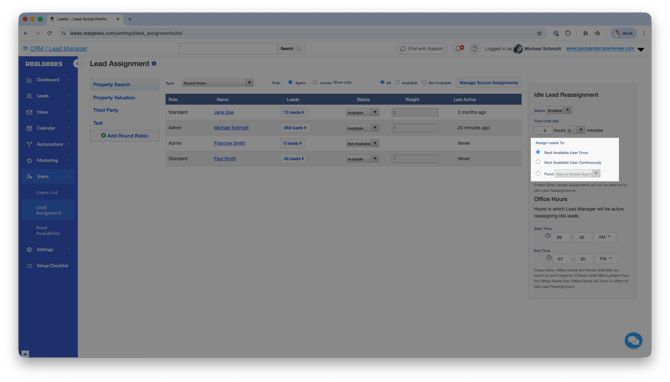
This setting controls where the lead goes if the original agent does not follow up.
-
Next Available User Once
The lead moves to the next agent in your Round Robin or Weighted Round Robin queue one time only. -
Next Available User Continuously
The lead keeps moving through your team until someone engages with it. This is ideal for teams that want to guarantee contact. -
Lead Pond
The lead is sent to a shared pool where agents can claim it. This creates a competitive, first-to-respond environment.
This is where you decide how your team handles missed opportunities. Structured handoff or open competition.
Office Hours
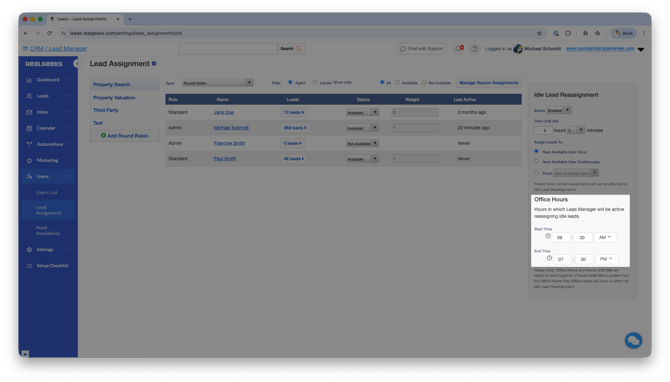
Office Hours control when the idle timer is active.
-
The timer pauses outside of your working hours
-
Leads that come in after hours will not be reassigned immediately
-
The timer resumes when your office hours begin again
This keeps things fair and realistic for your team while still enforcing accountability during working hours.
What clears idle lead reassignment?
Idle Lead Reassignment is tied to the New Lead Flag. A lead stays in this state until an agent makes a real contact attempt.
The following actions WILL clear the idle status:
-
Manual phone calls
-
Manual emails
-
Manual text messages
The following actions WILL NOT clear the idle status:
-
Automated emails
-
Automated text messages
-
Workflow or drip communication
This ensures your leads are getting real, human outreach and not just automated follow up.
Frequently Asked Questions
-
Can automated emails or texts prevent reassignment?
No. Only direct, manual communication from an agent counts as engagement and prevents reassignment. -
What happens if a lead is reassigned once?
It depends on your settings. If you select "Next Available User Once," it will not be reassigned again. If you choose continuous reassignment, it can keep moving until someone responds. -
What is a Lead Pond?
A Lead Pond is a shared pool of leads that multiple agents can access. When a lead is placed in a pond, agents can claim it on a first-come basis. -
Do leads get reassigned overnight?
No. Idle timing pauses outside of your defined office hours and resumes when business hours begin.
Need help?
- Call us at 844-311-4969 (Mon–Fri, 8 AM–8 PM CST)
- Email support@realgeeks.com
- View our Live Events page for free coaching and training.
- Join the Real Geeks Mastermind Group on Facebook for peer tips and best practices