.svg)
Sending emails from your Real Geeks CRM is a key part of consistent follow-up. If you use Google (Gmail) or Microsoft Outlook, you can connect directly using those built-in integrations. However, if your email provider does not offer a direct integration option, you can send emails through your own email provider using a custom SMTP email server. This guide explains what that means in plain language and walks you through how to set it up.
Need to Know
-
Google (Gmail) and Microsoft Outlook offer direct integration options inside the CRM
-
Use the Other SMTP setting to integrate a non-Google or Microsoft email with Real Geeks so sent emails are recorded in the CRM
-
If your login details are incorrect, emails will not send from the CRM
Table of Contents
What Is Other SMTP Setup?
Other SMTP setup means your Real Geeks CRM sends emails through your existing email provider's outgoing mail server, instead of using the built-in Google (Gmail) or Microsoft Outlook direct integrations. Emails sent this way are recorded in the CRM just like emails sent through the direct integrations.
In simple terms, when you send an email from a lead’s profile in the CRM, the system connects to your email provider’s outgoing mail server and delivers the message from your email address.
Your leads will see the email as coming directly from you, just like a normal email you would send from your inbox.
Why Would You Use a Custom SMTP Server?
Other SMTP setup is typically used when your email provider does not support direct Google (Gmail) or Microsoft Outlook integration inside the CRM.
Some agents prefer Other SMTP setup because:
-
They use a business email provider that is not Google or Microsoft
-
Their brokerage requires emails to be sent through a specific company server
-
They want full control over their email authentication settings
-
They do not want to connect their Google or Microsoft account to the CRM
If you use Gmail or Outlook, the direct integration option is usually the simplest setup. Other SMTP setup is an alternative for other providers.
Before You Start
Before setting up SMTP only email, make sure:
-
Any existing Gmail or Outlook integration is disconnected in your Email Integration settings
-
You know your full email address and password
-
Your email provider allows third-party SMTP connections
-
You have any required server details from your email provider if auto-detection fails
If you are unsure whether your provider allows SMTP access, contact your email host or IT team first.
How to Set Up Other SMTP Email in the CRM
-
In your CRM: Go to Inbox > Message Settings
-
Click Setup Now
-
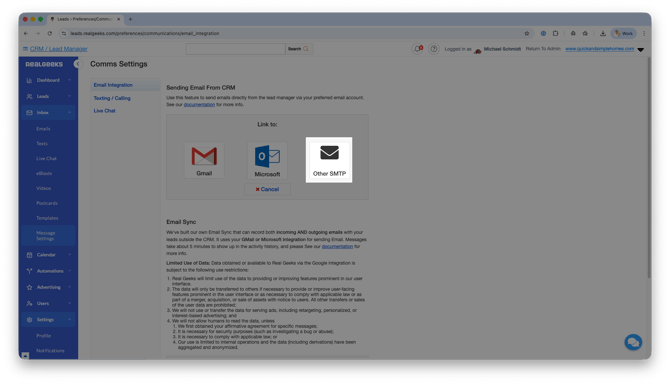
Select Other SMTP
-
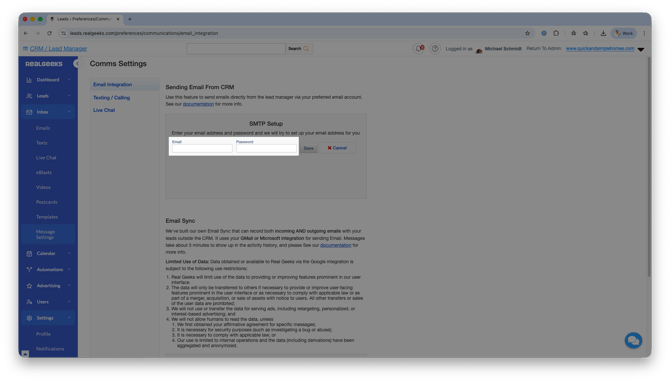
Enter your email address and login password
-
Click Save
After saving, the system will attempt to automatically detect your email provider’s SMTP settings.
If everything is configured correctly, you will see a success confirmation message. If the setup fails, double-check your email address and password, then try again. If auto-detection fails and you need to enter your SMTP settings manually, see the Common Issues and Tips section below for the required server details.
Common Issues and Tips
If emails are not sending, confirm the following:
-
Your email address is typed correctly.
-
Your password is entered correctly and up to date.
-
Your email provider does not require an app-specific password—or, if it does, that you’ve created and are using it.
-
Two-factor authentication (2FA) is not preventing the CRM from connecting.
-
Your email host does not require manual SMTP settings—or, if it does, that you’ve entered the correct SMTP server, port, and encryption details.
If the CRM cannot automatically detect your server settings, you will need to enter them manually. Contact your email provider or IT team to obtain the following details:
-
SMTP server name
-
Port number
-
Encryption type (SSL or TLS)
Your email provider’s support team can supply this information. For help troubleshooting your SMTP setup, contact support@realgeeks.com.
Frequently Asked Questions
-
What does SMTP mean in simple terms?
SMTP stands for Simple Mail Transfer Protocol. It is the standard system email providers use to send outgoing email. When you configure SMTP in Real Geeks, the CRM routes your outgoing messages through your email provider's server so they are delivered from your own email address. -
Do I have to use Other SMTP setup?
No. If you use Google (Gmail) or Microsoft Outlook, you can use the direct integration option instead. Other SMTP setup is optional and typically reserved for other email providers. -
Will my leads know I am using SMTP?
No. Emails appear as normal messages sent from your email address. -
What happens if I change my email password?
You must update your password in the CRM's Email Integration settings. Go to Inbox > Message Settings, select your Other SMTP connection, and re-enter your new password. If you do not update it, emails will stop sending from the CRM. -
Can I use SMTP with any email provider?
Most providers allow SMTP access, but you should confirm with your email host.
Need Help?
- Call us at 844-311-4969 (Mon–Fri, 8 AM–8 PM CT)
- Email support@realgeeks.com
- View our Live Events page for free coaching and training.
- Join the Real Geeks Mastermind Group on Facebook for peer tips and best practices