.svg)
This article provides an overview of how the Dotloop integration works in Real Geeks. It explains how to connect your account, how leads are sent, and what to expect when using this integration to move leads into your transaction workflow.
Need to Know
-
Dotloop is a manual integration inside the Lead Manager. Leads are not automatically sent to Dotloop.
-
Leads must be selected and sent by an agent
-
Each agent must connect their own Dotloop account
-
Leads sent to Dotloop are created as new Loops
Table of Contents
What Is the Dotloop Integration?
The Dotloop integration allows agents to send leads from the Lead Manager directly into Dotloop. This helps you move contacts from lead status into active transactions.
Instead of re-entering contact information, you can send selected leads into Dotloop and begin working the deal right away.
How Dotloop Works in Real Geeks
Dotloop is set up as a manual destination in the Lead Manager. This means leads are not sent automatically when they are created.
Agents choose which leads to send and when to send them. Once sent, each lead is created as a new Loop in Dotloop.
Setup Requirements
Before sending leads, each agent must connect their Dotloop account.
To set up the integration:
-
Go to your Real Geeks Third Party Settings
-
Locate Dotloop
-
Connect your Dotloop account
Each agent must complete this setup individually.
Sending Leads to Dotloop
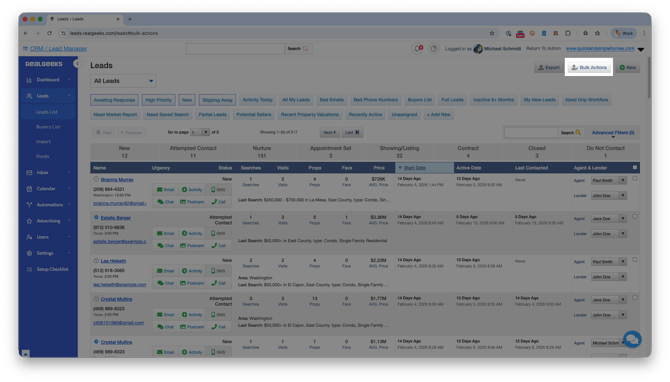
Once connected, you can send leads at any time from the Leads List.
-
Go to the Leads List in the Lead Manager (leads.realgeeks.com/leads)
-
Select one or more leads
-
Click Bulk Actions > Send to…
-
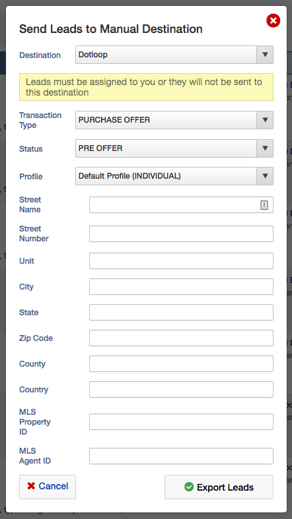
Choose Dotloop
-
Enter any additional details
-
Click Export Leads
Each selected lead will be created as a Loop in Dotloop.
Important Notes
-
This integration is manual only. Leads are not sent automatically
-
Updates do not sync between systems
-
Changes in the Lead Manager will not update in Dotloop
-
Changes in Dotloop will not update in the Lead Manager
-
Only send leads when they are ready to move into a transaction
Frequently Asked Questions
-
Do leads automatically sync to Dotloop?
No. Leads must be manually selected and sent by an agent. -
Can all agents use this integration?
Yes, but each agent must connect their own Dotloop account first. -
Will updates sync between Real Geeks and Dotloop?
No. The integration does not support two-way syncing. -
What happens when I send a lead?
The lead is created as a new Loop in your Dotloop account.
Need Help?
- Call us at 844-311-4969 (Mon–Fri, 8 AM–8 PM CST)
- Email support@realgeeks.com
- View our Live Events page for free coaching and training.
- Join the Real Geeks Mastermind Group on Facebook for peer tips and best practices