.svg)
Geek AI Text is an AI texting assistant built to help you convert more leads. Robin, the voice of Geek AI, follows up with leads automatically, builds relationships over time, and lets you know when it's time to step in.
Table of Contents
What Is Geek AI Text?
Most online leads aren't ready to buy or sell right away. They often need months of follow-up before they're ready to work with an agent.
Real estate is a long-term business, and Geek AI Text was built specifically for it. Unlike general AI tools, Robin uses an agentic team of custom AI models and proven communication strategies to personalize text conversations, build relationships, and help you stay connected with more leads.
Why long-term follow-up matters
-
The average lead conversion timeline starts at 3 months.
-
Agents who follow up 6 to 10 times see up to a 300% increase in conversions compared to agents who stop after only 1 or 2 attempts.
Long-term follow-up gets results. Geek AI Text helps you stay connected without adding more work to your day.
How Geek AI Text Works
Your Real Geeks website, Lead Manager, and Geek AI Text all work together. This gives Robin the context it needs to choose the next best step for every lead.
Robin uses the following information to personalize conversations:
-
New registrations: Starts conversations with new leads.
-
Property searches, views, and favorites: Understands what homes interest each lead.
-
Website activity: Adjusts follow-up based on how engaged a lead is.
-
Calls, emails, texts, and CRM notes: Uses previous conversations to avoid repeating questions.
-
Buying and selling signals: Recognizes when it's time for an agent to step in.
Robin is designed to build relationships over time, not send the same message to every lead.
How Robin Reacts to Lead Activity
Robin also recognizes specific behaviors that can trigger a more timely follow-up.
Robin currently responds when a lead:
-
Favorites a property.
-
Returns after 14 days of website inactivity.
-
Views 10 properties within 7 days.
-
Views the same property 3 times within 5 days.
-
Visits your website 3 times within 7 days.
When Robin recognizes these behaviors, it can adjust what it says and when it reaches out, helping you connect with leads as their interest grows.
These responses happen automatically and don't require any additional setup.
Robin Office Hours
To help you comply with TCPA quiet hour guidelines and provide a better experience for your leads, Robin only sends automated text messages during your configured Office Hours.
By default, Office Hours are:
- Monday–Saturday: 9:00 AM–9:00 PM
- Sunday: 12:00 PM–9:00 PM
If a lead registers outside your Office Hours, Robin automatically schedules its first message for the next available sending window.
You can customize your Office Hours at any time from Automations > Office Hours.
Short-Term Timeline Example
-
Monday morning: A new lead registers. Robin starts the conversation.
-
Monday midday: The lead texts back on their lunch break saying they’re “just browsing.” Robin reviews the lead’s website activity and uses it to frame thoughtful questions that make it easy for the lead to open up about their search preferences and motivation.
-
Monday evening: After conversing with Robin throughout the afternoon, the lead feels comfortable connecting with an agent to see some homes. Robin notifies the agent that it's time to take over the conversation.
Long-Term Timeline Example
-
Early January: A new lead registers. Robin starts the conversation.
-
Early February: After a few attempts to connect, the lead still hasn't responded but continues "lightly" searching for homes on your website. Robin adjusts its follow-up strategy, spacing out messages while staying connected.
-
Early April: After 14 days of inactivity, the lead returns to your website and starts viewing homes again. Robin recognizes the renewed interest and reaches out sooner with a personalized message.
-
Late May: The lead replies and asks to schedule a showing. Robin notifies the assigned agent that it's time to take over the conversation.
Setting Up Geek AI Text
Geek AI Text is included with Real Geeks lead generation packages and is also available as a paid add-on.
Once enabled, account owners and admin users can configure Geek AI Text settings. Standard users can enable or disable Robin for their assigned leads after an account owner or admin grants them access.
How to Enable Geek AI Text
-
Go to leads.realgeeks.com.
-
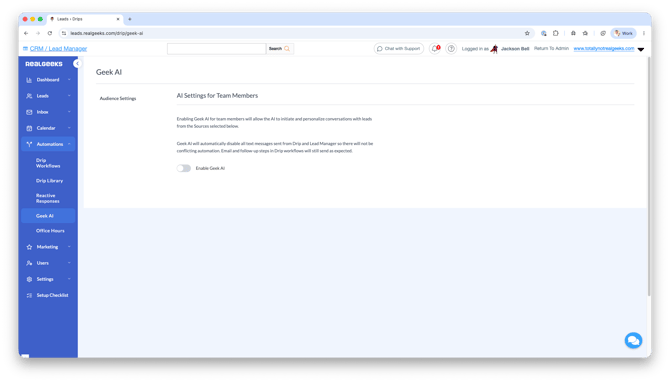
From the Automations menu, select Geek AI Text.
-
Select Enable Geek AI Text.
-
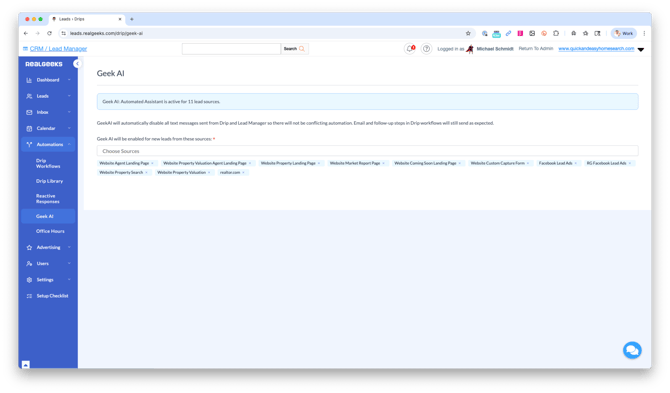
Click the Choose Sources field.
-
Select the lead sources you want Geek AI Text to manage.
-
Repeat this process for each lead source you want to enable.
Once enabled, Robin will automatically begin engaging eligible leads from the selected sources.
Team Settings
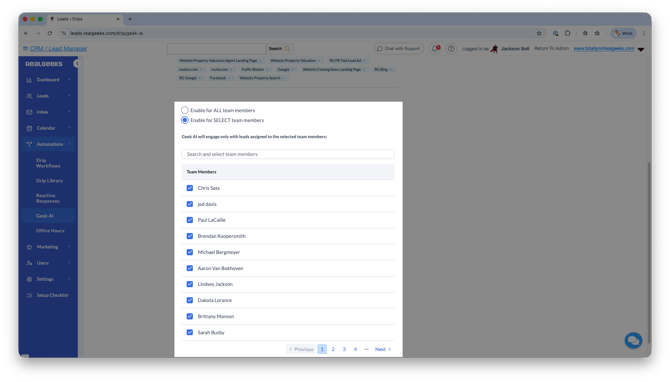
Account owners and admins can also control which agents use Geek AI Text.
-
Enable for All Team Members: Robin will automatically communicate with leads assigned to every agent.
-
Enable for Selected Team Members: Only the agents you choose will have Robin communicate with their assigned leads.
Important
Even after your account owner enables Geek AI Text, each agent must enable it before Robin can communicate with their assigned leads.
Go to https://leads.realgeeks.com/drip/geek-ai and select Enable Geek AI Text.
Managing Conversations
Robin handles the day-to-day follow-up so you can focus on the leads that are ready to buy or sell.
You can:
- Read every conversation between Robin and your leads.
- Step into a conversation at any time.
- Click Stop Assistant in a text conversation to take over the lead yourself.
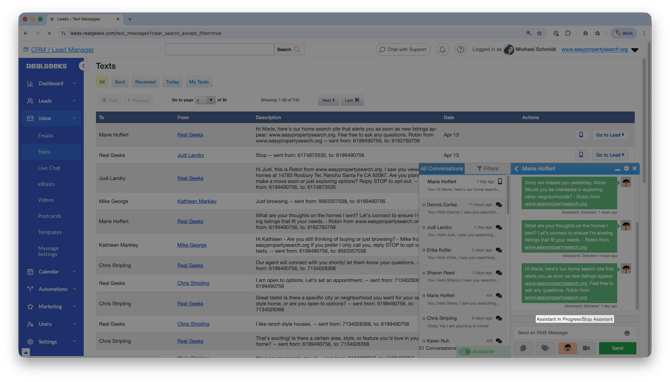
- Receive notifications when Robin believes it's time for you to take over the conversation.
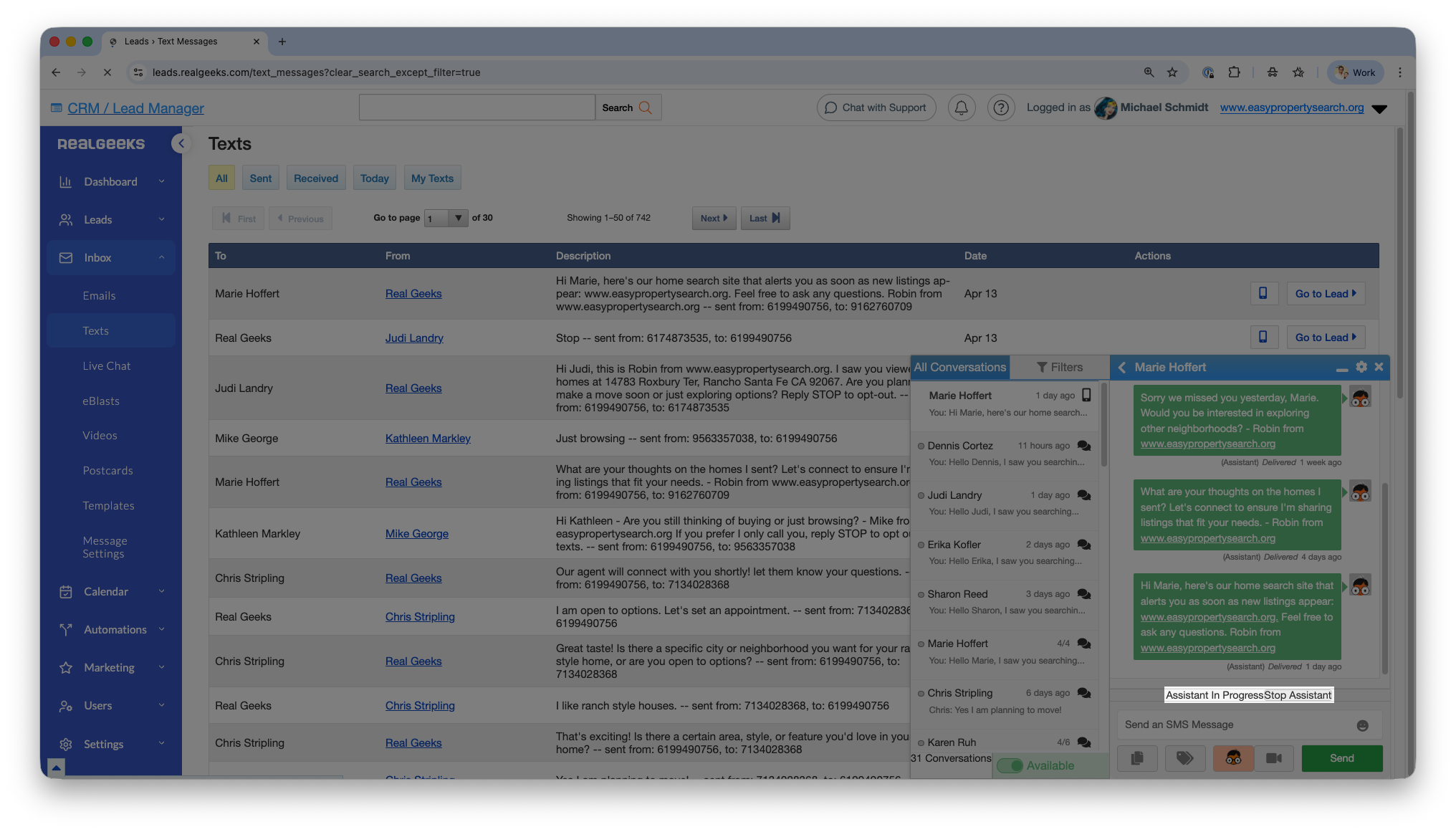
When you take over, Robin steps aside so you can continue the conversation without interruption.
Assistant Handoff Notifications
Robin will notify you when a lead is ready for a personal conversation so you know when it's time to step in.
To enable or customize these notifications:
-
Go to leads.realgeeks.com.
-
From the Settings menu, select Notifications.
-
Choose Custom.
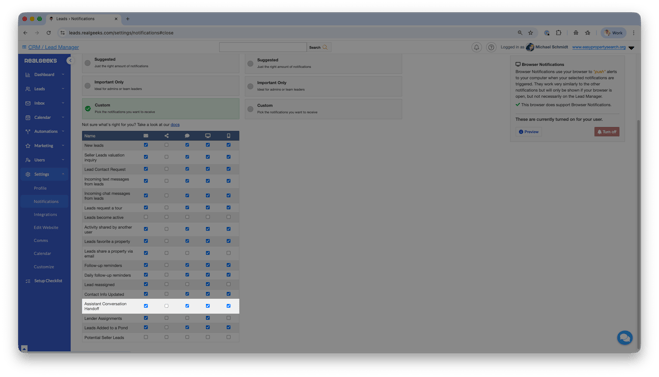
-
Next to Assistant Conversation Handoff, choose how you'd like to be notified by email, text message, or the mobile app:
Once Geek AI Text is stopped for a lead, it cannot be reactivated.
Only select Stop Assistant when you're ready to fully manage the conversation yourself.
Pricing
Geek AI Text is included in all marketing packages, with up to 2,500 new conversations per month. If you don't have a lead generation package, Geek AI Text can be purchased as a standalone add-on.
Pricing is based on the number of new AI conversations Robin can start each month.
- Up to 2,500 leads: $49/month (or $0 if you have a Real Geeks done-for-you lead gen package)
- 2,501 – 10,000 leads: $99/month (or $50 with a lead-gen package)
- 10,001+ leads: $199/month (or $150 with a lead-gen package)
Conversation Limits
If Geek AI Text reaches your monthly lead limit, Robin will continue conversations with leads it has already engaged. It will not begin conversations with additional new leads until your monthly limit resets.
Need a higher conversation limit?
Add or Upgrade Your Geek AI Text
Click here to fill out our form to sign up for Geek AI.
By submitting this form, you are agreeing to sign up for Geek AI Text. The service will be added and you will be charged within 1 business day.
Frequently Asked Questions
-
Who is Robin?
Robin is the voice of Geek AI Text. Your leads will receive text messages from Robin while Geek AI Text builds the relationship behind the scenes. -
How does Robin know what to say?
Robin uses your lead's website activity along with calls, emails, text messages, and notes in Lead Manager to understand where each lead is in their journey. It also recognizes specific website behaviors to adjust when it reaches out and what it says. -
Can I take over a conversation?
Yes. You can step into any conversation or stop Robin for an individual lead at any time. -
Will Robin text my leads every time they view a property?
No. Robin responds to specific website behaviors, not every view. For leads who haven't replied, it waits at least 2 hours between messages, sends at most one behavior-based message daily, and won't respond to the same behavior again for 14 days. All messages stay within your configured Office Hours. -
Can I change when Robin sends text messages?
Yes. Robin only sends automated text messages during your configured Office Hours to help you comply with TCPA quiet hour guidelines and provide a better experience for your leads. By default, Office Hours are Monday–Saturday, 9:00 AM–9:00 PM, and Sunday, 12:00 PM–9:00 PM (based on your local time zone). You can customize these hours at any time by going to Automations > Office Hours. -
Does Robin replace the agent?
No! Geek AI Text is designed to help you convert more leads, not replace you. Robin handles long-term follow-up and lets you know when it's time for you to step in.
Geek AI doesn't replace your expertise. It expands your capacity. -
What happens if I reach my monthly lead limit?
Robin will continue conversations with leads it has already engaged. It won't begin conversations with additional new leads until your monthly limit resets. Contact Real Geeks Support if you'd like to increase your lead limit.
Need Help?
- Call us at 844-311-4969 (Mon–Fri, 8 AM–8 PM CST)
- Email support@realgeeks.com
- View our Live Events page for free coaching and training.
- Join the Real Geeks Mastermind Group on Facebook for peer tips and best practices