.svg)
Sharing a property is one of the fastest ways to start a conversation. This is especially useful when you are reaching out to someone who is not yet in your CRM. This guide shows you how to send a direct property link so they can view a home without friction and helps you get a response faster.
Need to Know
-
You can share a single property using a special URL format
-
This is designed for someone who is not yet a lead in your CRM
-
This only works for brand new visitors who have never been on your website before
-
If someone has already visited your site, they may still be asked to sign up
-
IMPORTANT: If Geek Verified Leads is enabled on your website, visitors can open the property and view the listing details, but they’ll be prompted to register after viewing 3 photos.
Table of Contents
How to Share a Property Without Sign-Up
To share a property without forcing someone to sign up, you will use a direct property link.
Follow this format:
www.yourwebsite.com/property/MLSNUMBER
Example:
-
www.yourwebsite.com/property/1234565
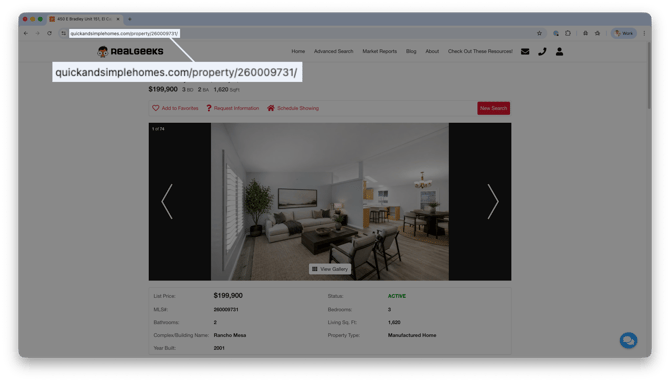
Steps:
-
Find the MLS number for the property.
-
Take your website domain and add
/property/plus the MLS number to the end of your domain:
Example: www.yourwebsite.com/property/1234567
When a brand new visitor clicks this link, they can view that one property without being asked to register.
When This Works (and When It Doesn’t)
This method works best when:
-
You are sharing with someone who has never visited your website before
-
You are reaching out to a brand new prospect
This may not work if:
-
The person has already visited your site before
-
Your website recognizes them as a returning visitor and asks them to sign up
If Geek Verified Leads is enabled:
-
The visitor can open the property page
-
They can view the property details
-
After viewing 3 photos, they will be asked to sign up
Best Practices
-
Use this link when texting or emailing a brand new prospect
-
Use it to start a conversation without friction
-
Follow up quickly after they view the property
-
Do not rely on this for long-term browsing behavior
Example message:
“Hey! I found a home you might like. Take a look here and let me know what you think.”
This works best when you want a quick response and an easy way to start the conversation.
Frequently Asked Questions
-
Will this always bypass the sign-up?
No. It only works for people who have never visited your website before. -
Can I share multiple properties this way?
This method is designed for a single property at a time. -
What happens after they view the property?
If they continue browsing, they may eventually be asked to sign up. -
Why would I use this instead of a normal link?
It lowers friction and makes it easier for a new lead to engage with you.
Need Help?
- Call us at 844-311-4969 (Mon–Fri, 8 AM–8 PM CST)
- Email support@realgeeks.com
- View our Live Events page for free coaching and training.
- Join the Real Geeks Mastermind Group on Facebook for peer tips and best practices