.svg)
This guide explains how to view and access your Real Geeks invoices from the Accounts page. Real Geeks makes it easy to view your invoices anytime through your Accounts page. In just a few clicks, you can access your full receipt history and review past charges.
Need to Know
-
Your invoices are located in your Real Geeks Accounts page (not inside the CRM)
-
You can only view invoices for billing periods that have already been processed
-
Each invoice is organized by month under Receipt History
-
You can have only one payment method on file per account
Table of Contents
How to View Your Invoices
Follow these steps to access your invoice history:
-
Go to accounts.realgeeks.com
-
Click Billing
-
Under Receipt History, select the month you want to view
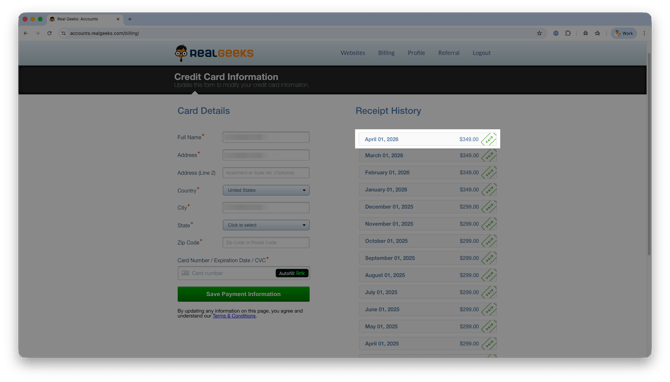
Once selected, your invoice will display with a breakdown of charges for that billing period.
If you need a printed or saved copy, use your browser's print function (Ctrl+P on Windows / Cmd+P on Mac) to print the page or export it as a PDF.
Frequently Asked Questions
-
Where do I find my invoices?
Your invoices are located in the Billing section of your Real Geeks Accounts page. -
Can I download my invoices?
No, invoices cannot be downloaded. Once you select a month from Receipt History, you can view the invoice and save the link or bookmark the page for future access. -
Why don’t I see a recent invoice?
Invoices only appear after a billing cycle has been completed and processed. -
Can I have multiple payment methods on file?
No, Real Geeks accounts support only one payment method on file at a time. To update it, visit the Billing section of your Accounts page.Accepted payment methods include major credit and debit cards.
Need Help?
- Call us at 844-311-4969 (Mon–Fri, 8 AM–8 PM ET)
- Email support@realgeeks.com
- View our Live Events page for free coaching and training.
- Join the Real Geeks Mastermind Group on Facebook for peer tips and best practices