.svg)
Admin Only
This step must be completed by the Site Owner only. No action is required from other users.
Keeping your billing information up to date ensures your Real Geeks account continues running without interruptions. Whether you're replacing an expired card or switching payment methods, updating your credit card only takes a few steps inside your account settings.
Need to Know
-
You can only have one credit card on file per account
-
Billing updates are managed in your Real Geeks Accounts page
-
Changes take effect immediately after saving
-
Split billing requires each partner to maintain their own card on file
Table of Contents
How to Update Your Credit Card
Follow these steps to update your payment method:
-
Go to your Real Geeks Accounts page
-
Click Billing (or go to accounts.realgeeks.com/billing)
-
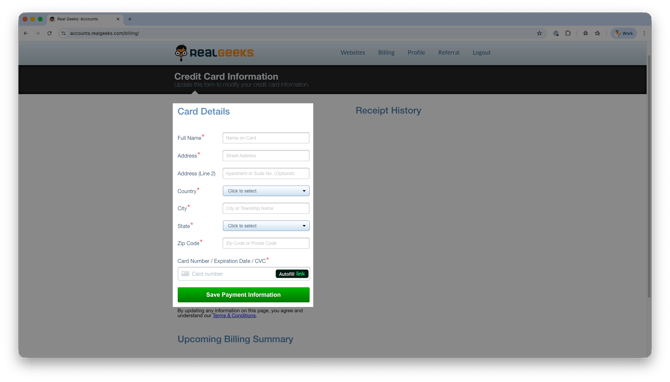
Under the Card Details section, enter your updated credit card information
-
Click Save Payment Information
Once saved, your new card will be used for all future billing cycles.
Split Billing Requirements
If you are using split billing with a partner, each user must manage their own payment method.
-
Each partner must log into their own Real Geeks account
-
Each account can only store one credit card
-
Billing is not shared across accounts
This ensures each user is billed individually based on their setup.
Frequently Asked Questions
-
Can I add multiple credit cards to my account?
No, only one credit card can be stored on your account at a time. -
When does my new card take effect?
Your updated card is used immediately after you save your payment information. -
What happens if my card expires?
If your card expires and is not updated, your billing may fail and impact your account access. -
Do both partners need a card for split billing?
Yes, each partner must have their own credit card saved in their individual account.
Need Help?
- Call us at 844-311-4969 (Mon–Fri, 8 AM–8 PM CST)
- Email support@realgeeks.com
- View our Live Events page for free coaching and training.
- Join the Real Geeks Mastermind Group on Facebook for peer tips and best practices