.svg)
Admin Only
This step must be completed by the Site Owner only. No action is required from other users.
Your Real Geeks subscription includes a Base Platform and optional marketing packages that work together to help you generate leads, manage client relationships, and grow your business. This guide covers how to view your subscription, what's included with the Base Platform, available marketing packages and optional add-ons, and CRM user billing.
Need to Know
-
Every Real Geeks account includes the Base Platform.
-
Optional marketing packages can be added based on your business goals.
-
Only the Account Owner or users with billing access can view subscription details at accounts.realgeeks.com/billing.
-
Geek AI Text is included with all marketing packages or can be purchased separately.
-
Additional CRM user charges may apply if you exceed the included CRM seats.
Table of Contents
How to View Your Current Billing Information
There are two ways to access your billing information.
Option 1: Access Billing Directly
-
Log in to accounts.realgeeks.com.
-
Click Billing in the top navigation.
-
Review your subscription details under Upcoming Billing Summary.
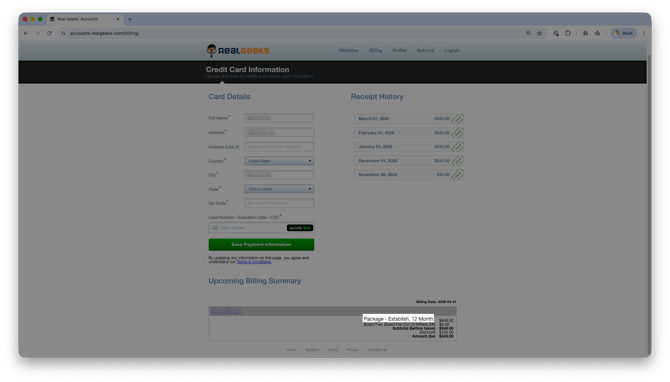
Option 2: Access Billing from Inside the Lead Manager
- In the Lead Manager, click your domain name in the upper-right corner.
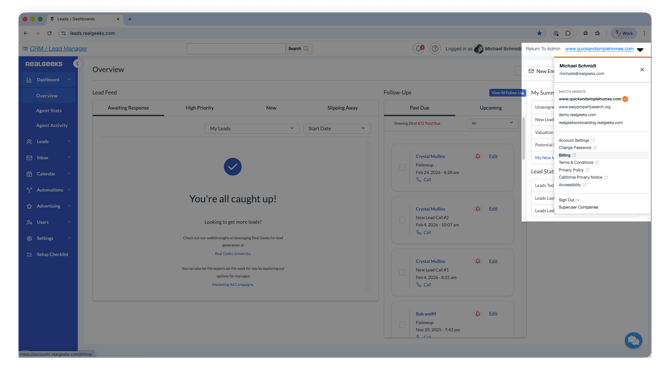
- Select Billing.
- Review your subscription details under Upcoming Billing Summary.
Your active subscription, pricing details, and upcoming billing information are displayed on this page.
Understanding Your Subscription
Your Real Geeks subscription is made up of two parts:
The Base Platform provides the tools you need to build your online presence, manage your leads, and grow your business.
Marketing packages can be added to generate buyer and seller leads through professionally managed advertising.
Optional services, such as Geek AI Text, are also available if they are not already included with your subscription.
Base Platform
Every Real Geeks subscription includes the Base Platform. It provides the core tools you need to build your online presence, generate leads, manage client relationships, and grow your business.
Website
Create a professional online presence designed specifically for real estate.
Includes:
-
IDX Website
-
Custom domain name
-
Real-time MLS listings
-
Unlimited landing pages
-
SEO & AEO optimization
Lead Manager (CRM)
Organize your database, communicate with leads, and stay on top of every opportunity.\
Includes:
-
Lead Manager (CRM)
-
2 included CRM users
-
Unlimited calling, texting, email, and video communication
-
Website activity alerts
Lead Generation & Marketing Tools
Capture more leads and keep your database engaged with built-in marketing and automation tools.
Includes:
Training & Support
Get the resources and expert guidance you need to succeed with Real Geeks.
Includes:
-
1:1 onboarding
-
Unlimited U.S.-based phone, email, and chat support
- Email at support@realgeeks.com
- Call at 844-311-4969
Pricing
The Base Platform is available on two billing schedules, plus a one-time setup fee.
12-Month Commitment
- $399 per month (additional taxes + fees may be included)
Annual Billing
- $3,990 per year (receive the equivalent of 2 months free)
One-Time Setup Fee
- $500
Marketing Packages
Add one or more marketing packages to generate buyer and seller leads through professionally managed advertising campaigns.
Social Marketing Package
Professionally managed Facebook and Instagram advertising.
Pricing
-
12 Months: $299/month
-
6 Months: $499/month
Search Marketing Package
Professionally managed Google Search advertising for buyer leads.
Pricing
-
12 Months: $599/month
-
6 Months: $799/month
Seller Marketing Package
Professionally managed Google Search advertising focused on attracting seller leads.
Pricing
-
12 Months: $599/month
-
6 Months: $799/month
Interested in upgrading to a marketing package?
AI Features
Geek AI Text is an optional add-on that automates personalized text conversations with your leads.
Geek AI Text Pricing
-
$49/month
-
Supports up to 2,500 leads per month
Geek AI Text is Included With Marketing Packages
Geek AI Text is included at no additional cost with any of our marketing packages (Social, Search and Seller)
Additional CRM User Costs
The Base Platform includes 2 CRM user seats at no cost: one for the Site Owner and one additional CRM user.
If you need more than the 2 included CRM users, additional users are billed using a tiered pricing model. As your team grows, the cost per additional CRM user decreases.
Additional CRM User Pricing
-
2-10 Users: $25/month per user
-
11-40 Users: $10/month per user
-
41-100 Users: $5/month per user
-
101+ Users : $1/month per user
Important
Agents can be granted access to the Website Editor and Facebook Ad Tool at no additional cost.
This allows you to create agent-specific IDX landing pages and grant website or advertising access without increasing your CRM user count or monthly subscription cost.
To learn how to create users and manage permissions, see How to Give Agents Access to the Website, CRM, and Facebook Ad Tool.
Frequently Asked Questions
-
I don't see a Billing tab. What should I do?
If you do not see the Billing tab, you may not have Account Owner or billing permissions. Contact your Account Owner to request access, or reach out to Real Geeks Support at 844-311-4969 or support@realgeeks.com. -
Can I change my subscription or add a marketing package?
You can view your subscription details from the Billing page, but to make changes or add a marketing package, contact the Real Geeks team at 844-311-4969 or support@realgeeks.com. -
Can I have more than one marketing package?
Yes. Marketing packages can be added based on your business needs. Contact the Real Geeks team to discuss available options. -
Will I see upcoming charges here?
Yes. The Upcoming Billing Summary shows your next billing date and amount. -
Will I be charged for every user I add?
No. Website Editor and Facebook Ad Tool users do not count toward CRM user billing. Charges only apply when a user is granted access to the Lead Manager (CRM) and your account exceeds the included CRM seats.
Need More Help
-
Call us at 844-311-4969 (Mon–Fri, 8 AM–8 PM CST)
-
Email support@realgeeks.com
-
View our Live Events page for free coaching and training.
-
Join the Real Geeks Mastermind Group on Facebook for peer tips and best practices