.svg)
Secondary Contacts in the Real Geeks CRM allow you to connect two people to the same lead profile. This is especially useful for spouses, partners, or co-buyers who are searching for a home together and want to stay on the same page. This helps you keep communication aligned when multiple people are involved in a home search or sale, while both individuals stay informed through shared property updates without creating duplicate leads.
Need to Know
-
You can add one secondary contact to a lead profile
-
Secondary contacts receive the same property update emails as the primary lead, including Saved Searches and Market Reports
-
Secondary contacts cannot be directly contacted from the CRM
Table of Contents
What Is a Secondary Contact
A secondary contact is an additional person linked to a single lead profile in the Lead Manager. This is most commonly used for spouses, partners, or co-buyers who are actively searching together and want to receive the same property updates.
Instead of managing two separate leads, you can keep both individuals connected under one profile while ensuring they both stay informed.
When you add a secondary contact, they are included in all automated property communications sent to the primary lead.
This includes:
-
Saved Searches
-
Market Reports
Both contacts receive the same listings at the same time, making it easier for them to review and compare properties together.
How to Add a Secondary Contact
Follow these steps to add a secondary contact to a lead profile:
-
Open the lead’s profile in the Lead Manager
-
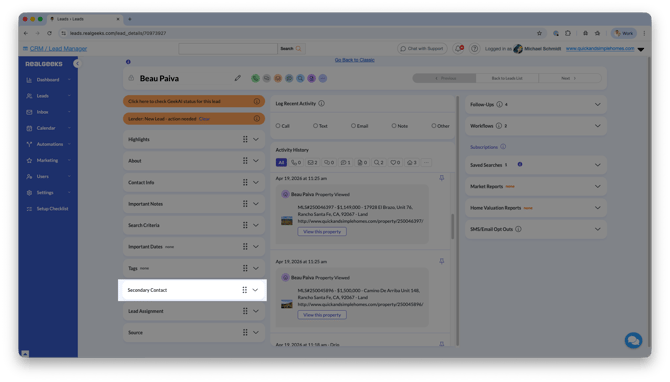
In the Secondary Contact section, click Edit
-
Enter the contact’s information (name, email, phone number, etc...)
-
Click Done
Once saved, the secondary contact will begin receiving the same property update emails as the primary lead.
When to Use a Secondary Contact
Use a secondary contact when two people are working together in the buying or selling process.
Common scenarios include:
-
Spouses searching for a home together
-
Partners comparing listings
-
Family members involved in decision making
This keeps communication simple and avoids sending duplicate or mismatched property updates.
Limitations to Be Aware Of
There are a few important limitations when using secondary contacts:
-
Only one secondary contact can be added per lead
-
Secondary contacts cannot be directly contacted through the CRM
-
You cannot send individual emails or texts specifically to the secondary contact
If you need to communicate with the second person directly, you should create a separate lead for them. This allows you to send messages, assign follow-ups, and manage their activity independently.
Frequently Asked Questions
-
Can I add more than one secondary contact?
No, each lead profile can only have one secondary contact. -
Will the secondary contact receive emails automatically?
Yes, they will receive all property-related emails sent to the primary lead. -
Can I text or email the secondary contact directly?
No, secondary contacts cannot be directly contacted through the CRM. -
What should I do if I want to communicate with both people separately?
Create a separate lead for the second person so you can manage communication individually.
Need Help?
- Call us at 844-311-4969 (Mon–Fri, 8 AM–8 PM CST)
- Email support@realgeeks.com
- View our Live Events page for free coaching and training.
- Join the Real Geeks Mastermind Group on Facebook for peer tips and best practices