.svg)
Admin Feature
This feature requires the account owner (or admin) to grant CRM Admin Permissions. If you don't see this option, contact your account owner to enable it for you.
This guide shows you how to send one email to many contacts at the same time. You’ll also learn how to target specific groups using filters so your messages stay relevant and get more engagement.
Quick Reference
Follow our email deliverability best practice guide to make sure your emails aren't marked as spam
-
You can send a message to all selected contacts from your Leads List.
-
Use filters before sending to reach the right audience.
-
You can include text, images, videos, and PDF attachments.
-
Scheduled sending is available for holiday notices or reminders.
Table of Contents
Choose Who You Want to Email
Before sending a mass email, decide whether you want to reach your entire database or a specific group of leads.
While you can email everyone in your CRM, targeted emails typically generate more opens, clicks, and replies. As a best practice, send emails to groups of 300 contacts or fewer and tailor your message to a shared interest, location, or need.
Use Advanced Filters to build targeted audiences and send more relevant messages.
Common filter options include:
- Location to target contacts searching in a specific city or neighborhood
- Urgency to engage Hot leads or reconnect with Long-Term leads
- Lead Type to focus on buyers, sellers, or renters
- Tags to group contacts by interests or other criteria
- Inactive Leads to re-engage contacts who haven't visited your website recently
You can also combine filters to create highly targeted audiences, such as buyer leads searching in Madison, WI.
Create a Custom Filter
-
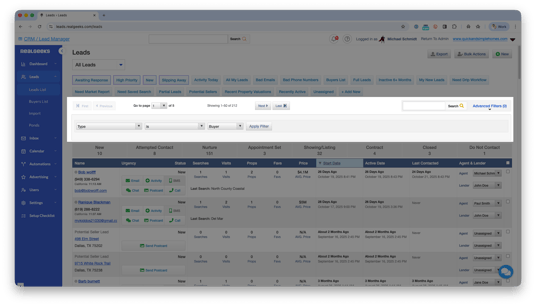
Click Advanced Filters.
-
Add conditions that define the group of contacts you want to email.
Examples:-
Type is Buyer
-
Tag is Pensacola FL
-
Urgency is Hot
-
-
Click Apply Filter to view matching contacts.
-
(Optional) Click Save Filter to reuse this audience later.
How to Send a Mass Email
Quick Version: Leads List → (optional) Filters → Bulk Actions → eBlast → Preview → Send
-
Go to your Lead List page.
-
Filter your contacts to create a targeted audience.
-
If you want to email your entire database, skip this step
-
-
Click Bulk Actions.

-
Select eBlast.
-
Fill out your email details:
-
Email Name: A label you’ll use to track performance later.
-
Template (optional): Load a saved message.
-
From: Choose whether the email comes from you or the assigned agent.
-
Subject Line: Keep it short and direct (example: New Homes Available in [City]).
-
Email Body: Add your message text, and include images, videos, links, or PDF files as needed.
-
-
Click Preview Email to review how it will look.
-
When everything is ready, click Send eBlast.
Optional
You can also schedule a delivery date. This is useful for holiday messages, event reminders, or any email you want written and queued in advance.
Monitor Email Performance
After sending an eBlast, you can review its performance to see how leads interacted with your message.
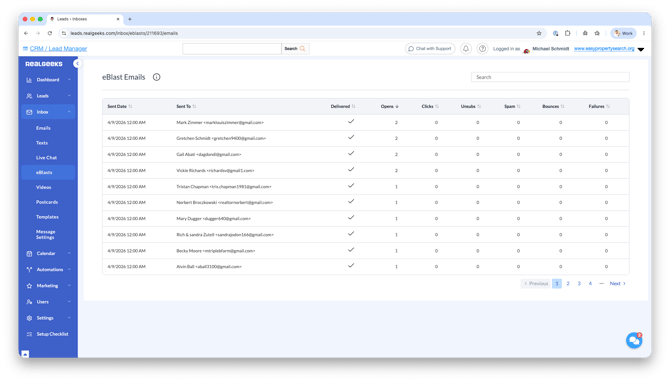
Go to Inbox → eBlasts or visit:
Locate the email you'd like to review and click View Details.
From here, you can see:
- Sent Date to view when the email was sent to your lead's inbox
- Recipient to confirm who received the email
- Delivered to verify the email was successfully sent
- Opens to see who viewed the email
- Clicks to identify leads who interacted with links in your message
- Unsubs to see who unsubscribed from future emails
- Spam to identify contacts who marked the email as spam
- Bounces to see emails that could not be delivered
- Failures to review email delivery errors
You can sort each column to quickly identify your most engaged leads. Contacts who regularly open and click your emails may be good candidates for a personal follow-up call, text, or email.
Reviewing your results can also help you improve future campaigns. If one audience, subject line, or topic generates more engagement than others, consider creating similar targeted emails in the future.
Email Deliverability Best Practices
Email deliverability refers to how reliably your emails reach your contacts’ inboxes instead of being filtered as spam. Following basic sending guidelines helps protect your email reputation and ensures future messages continue to be delivered successfully.
Key guidelines to follow
- Do not email more than 300 contacts at one time. Sending to larger groups increases the risk of spam filtering. If needed, break your list into smaller batches.
- Use filters to send relevant messages. Targeted emails are opened more often and receive fewer spam complaints.
- Avoid sending too frequently. Sending many emails in a short period can hurt deliverability.
- Email engaged contacts first. Leads who open and click emails help signal positive sender behavior.
- Focus on value. Helpful, targeted content is less likely to be marked as spam because people open emails that feel relevant to them.
For a deeper explanation of how email deliverability works and how to protect it long-term, review the Email Deliverability Best Practices guide.
Examples of Messages You Can Send
Use message types that match the group you selected:
-
Market updates for sellers or homeowners
-
New listing announcements for active buyers
-
Open house invites for local contacts
-
Seasonal tips for your entire database
-
Home maintenance reminders for past clients
-
Re-engagement prompts for cold leads (“Still planning a move this year?”)
These topic-focused emails help you stay top-of-mind and show your expertise.
Best Practices
- Use filters before sending. Targeted emails perform better than general blasts.
- Keep your message short. Focus on one topic to improve clicks.
- Use a clear subject line. Examples: “New Listings Near You,” “Your Monthly Market Snapshot.”
- Avoid sending too often. Consistent sending is good; over-sending can actually reduce engagement.
- Add value. Attach a useful guide, article, or listing list whenever appropriate.
- Revisit cold leads. Mass emails are a simple way to reconnect without pressure.
Need Help?
-
Call us at 844-311-4969 (Mon–Fri, 8 AM–8 PM CST)
-
Email support@realgeeks.com
-
View our Live Events page for free coaching and training.
-
Join the Real Geeks Mastermind Group on Facebook for peer tips and best practices