.svg)
Admin Feature
Editing the website is an account owner-level permission. If you don't see this option, contact your account owner to enable these permissions for you.
Featured Areas help you highlight the cities, neighborhoods, and communities you want to serve most. By featuring these areas on your website, you make it easier for visitors to access those markets, discover new listings, and explore homes they care about while reinforcing your local knowledge and expertise in the areas you know best.
This feature helps guide traffic intentionally, keeps visitors browsing longer, and supports long-term lead engagement by surfacing high-interest markets right on your site.
Need to Know
-
Featured Areas allow you to highlight up to 30 locations pulled right from your MLS
-
Locations can include cities, neighborhoods, counties, and other supported areas
-
Featured Areas appear in the sidebar area of your website
-
An image-based Featured Areas section is only available on the Anna Modern template
Table of Contents
Manage Featured Areas
Featured Areas create two highly visible sections in your website’s sidebar. One highlights the specific cities, neighborhoods, or communities you want to focus on, making it easy for visitors to explore popular and relevant markets.
The second section displays home valuations and custom market reports for those same areas, allowing visitors to review local pricing and trends.
Together, these sections help promote your key markets, guide visitors to relevant listings, and reinforce your local expertise.
Step-by-Step Instructions
- Open your website editor by adding /admin to the end of your website address (e.g. www.yourwebsite.com/admin)
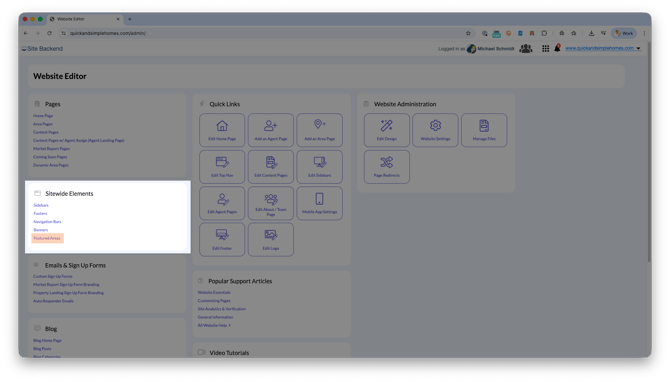
- Under Sitewide Elements, click Featured Areas
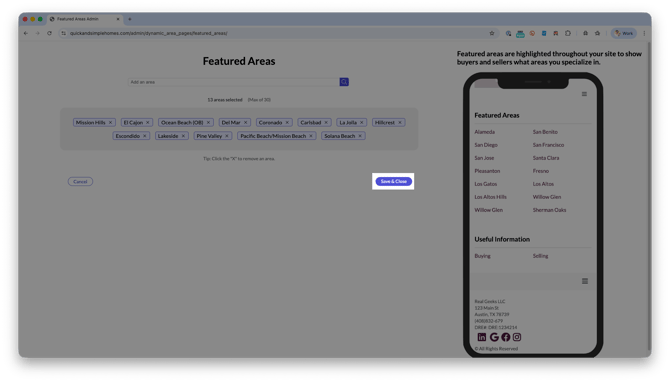
- Use the Add an Area field to start typing the location you want to feature
- Select the correct location from the suggested list
- Repeat to add additional featured areas, up to 30 total
- Click Save & Close to apply your changes
Where Featured Areas Appear on Your Website
Featured Areas are displayed in the sidebar area of your website. This section sits at the top of the sidebar, making featured locations one of the first things visitors see while browsing listings or content.
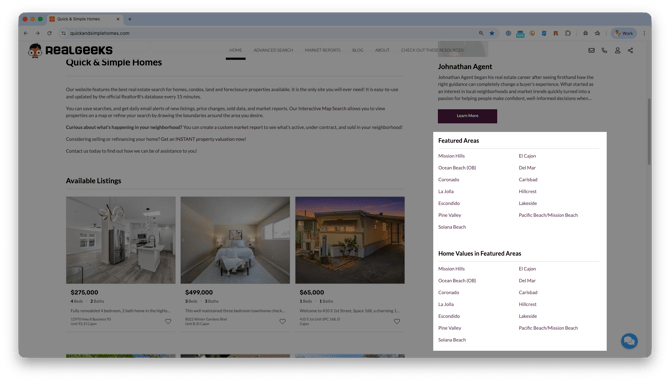 Because Featured Areas always appear at the top of the sidebar, they are easy for visitors to notice right away. This makes them a strong place to highlight popular markets, high-demand neighborhoods, or areas you want to focus on, while still allowing you to customize the rest of your sidebar as needed.
Anna Modern Template
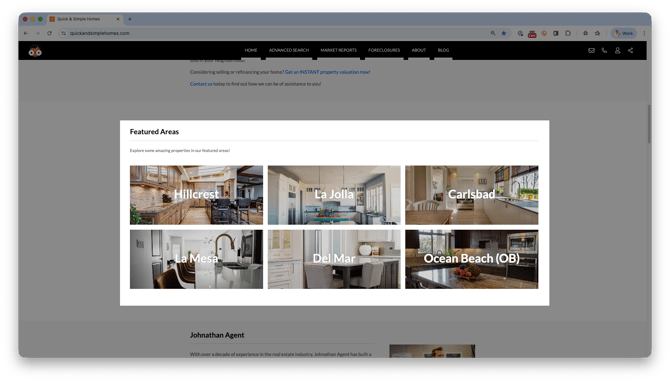 If you’re using the Anna Modern template, Featured Areas also appear in a dedicated section on your home page as visitors scroll down. This section includes six selectable image tiles:
-
A background image
-
The featured area name
-
A button to take leads to the page
Anna Modern Only
This image-based Featured Areas layout is only available on the Anna Modern template and provides a more modern, visual way to highlight key markets.
Adjust your website template in the Real Geeks website design editor.
You can add more tiles and customize the images in this section directly from the Home Page settings in your website editor.
To customize these tiles:
-
Open your website editor by adding /admin to the end of your website address (e.g. www.yourwebsite.com/admin)
-
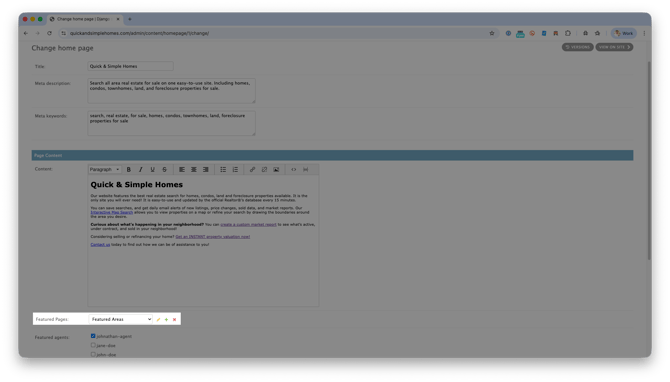
Click Home Page
-
Next to the Featured Pages menu, click the pencil icon
-
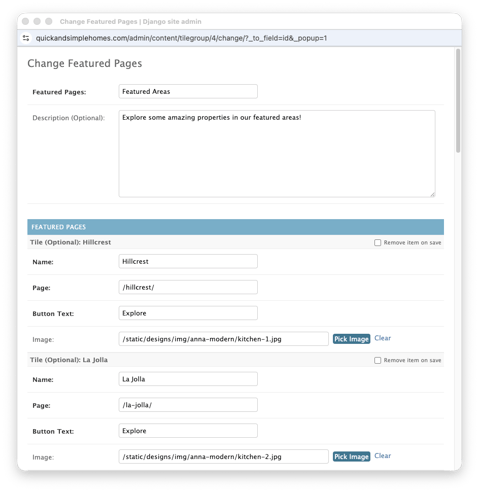
Customize:
-
Area name
-
Page link (use the page slug only, such as /houston/)
-
Button text
-
Background image for the tile
-
-
Click Save
You can add up to 12 tiles in this Featured Areas section, including links to non-area pages if you’d like to highlight other important content.
Frequently Asked Questions
-
Can Featured Areas be reordered?
No. Featured Areas display in the order they are added. -
How many Featured Areas can I add?
You can add up to 30 Featured Areas to your website sidebar. -
What types of locations can be used as Featured Areas?
Essentially any area you want more business in. Featured Areas can include cities, neighborhoods, counties, and other supported locations pulled directly from your MLS. -
Do Featured Areas create market reports automatically?
Yes. When a Featured Area is added, a corresponding market report section is created for that area in the sidebar. -
Can I link Featured Areas to non-area pages?
When using the Anna Modern template, you can link tiles to non-area pages such as buyer guides, seller resources, or custom content pages.
Need Help?
- Call us at 844-311-4969 (Mon–Fri, 8 AM–8 PM CST)
- Email support@realgeeks.com
- Visit Real Geeks University for free video courses
- Join the Real Geeks Mastermind Group on Facebook for peer tips and best practices