.svg)
Saved Searches and Market Reports are two of the most important tools for staying connected with your leads over time. These automated emails deliver relevant property updates and local market activity directly to your leads’ inboxes, helping you stay top of mind while they search, compare, and plan their next move. When used consistently, they create repeat engagement and give you more opportunities to start conversations.
Need to Know
-
Saved Searches send property updates based on a lead’s specific criteria and search behavior
-
Market Reports provide local market insights, ideal for seller leads and past clients
-
Both tools send automated Property Update Emails to keep leads engaged over time
-
Consistent follow-up with relevant content increases return visits and conversion opportunities
Table of Contents
What Are Saved Searches and Market Reports?
Saved Searches and Market Reports are automated follow-up tools built into your CRM that keep your leads engaged without requiring constant manual outreach.
-
Saved Searches focus on active buyers by sending listings that match their criteria
-
Market Reports focus on homeowners and long-term leads by sharing local market trends
Together, these tools help you provide ongoing value while your leads are still in the research phase. Most internet leads take time to convert, so consistent, relevant communication is key to staying in touch until they are ready to act.
Saved Searches
Saved Searches send automated Property Update Emails with listings that match a lead’s preferences. This keeps your website in front of buyers as new properties hit the market or change in price.
You can create multiple saved searches for each lead to match different needs or areas, helping you stay aligned with what they are actively looking for.
How to Create a Saved Search
-
Open a Lead in the CRM
-
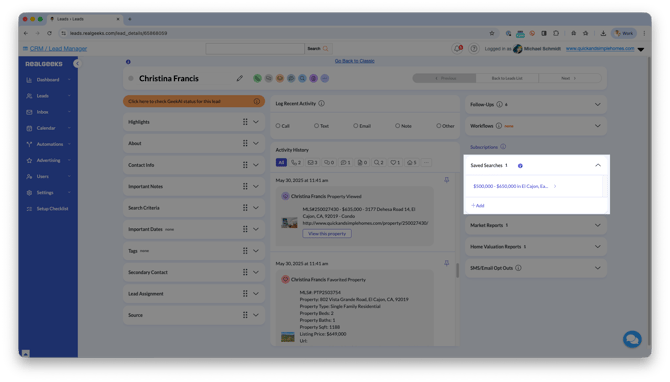
On the right side, click Saved Searches
-
Click +Add and use the Advanced Search tool to build criteria
-
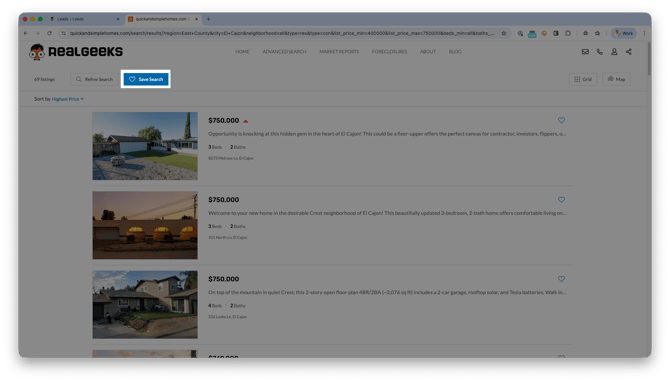
Build your search criteria, then click Search
-
At the top of the results page, click Save Search
Market Reports
Market Reports provide a high-level view of local market activity. These are ideal for seller leads, homeowners, and past clients who want to stay informed about pricing trends and neighborhood movement.
Sending Market Reports positions you as a knowledgeable resource while keeping your brand in front of contacts who may not be actively searching yet.
How to Create a Market Report
-
Open a Lead in the CRM
-
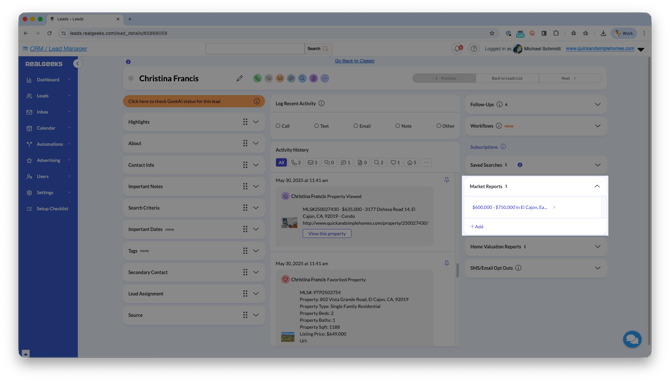
On the right side, click Market Reports
-
Click +Add and customize the report
-
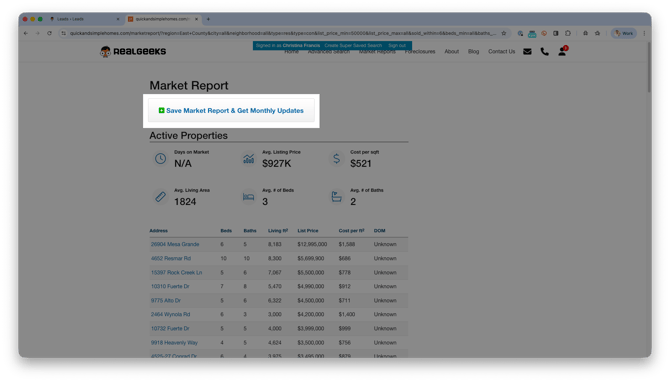
Click Go to Market Report
-
At the top of the page, click Save Market Report & Get Monthly Updates
Super (Duper) Saved Searches
Super Saved Searches allow you to create more detailed and specific property criteria for leads with very particular needs.
This is useful for clients who are searching in multiple areas, have strict requirements, or want highly curated results.
How to Create a Super Saved Search
-
Open the lead profile in the CRM
-
Click Saved Searches, then select + Add
-
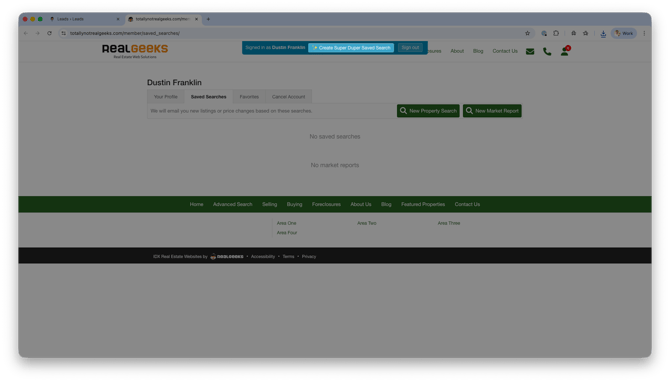
Click Create Super Duper Saved Search
-
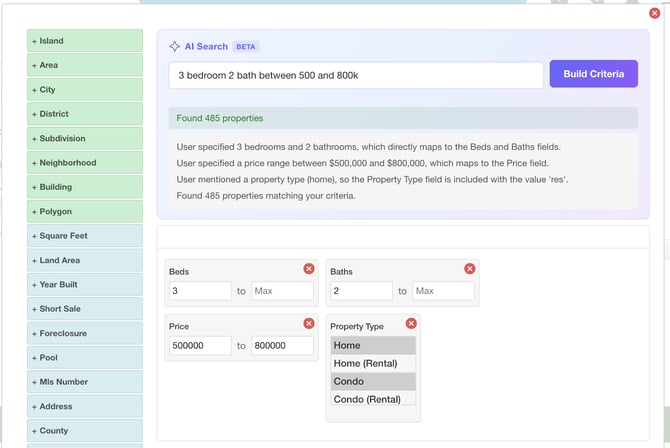
Enter your AI Description
-
Click Build Criteria
Best Practices for Engagement
To get the most value from these tools, focus on relevance and consistency.
-
Confirm the lead’s preferences before creating searches
-
Update searches as their needs change
-
Use multiple saved searches when appropriate
-
Pair automated emails with personal follow-up when a lead engages
These tools work best when they support your conversations, not replace them.
Avoiding Spam (Email Sunsetting)
Email Sunsetting helps protect your email deliverability by automatically adjusting how often leads receive emails if they stop engaging.
For example: if a lead receiving daily emails does not open multiple messages in a row, their frequency may be reduced to weekly.
If the lead re-engages by opening or clicking an email, they can return to their original frequency.
You can also manually adjust email frequency at any time from the lead’s profile.
This feature helps ensure your emails continue to reach inboxes while improving the chances your messages are seen.
Frequently Asked Questions
-
When are Property Update Emails sent?
Daily emails are sent every day, weekly emails are sent on Fridays, bi-weekly emails are sent on the 1st and 15th, and monthly emails are sent on the 1st of the month. -
What is included in Property Update Emails?
These emails include new listings, price changes, properties going under contract, and recently sold homes within the search criteria. -
Should every lead have a Saved Search or Market Report?
Yes. Buyer leads should have at least one Saved Search, and seller or long-term leads should have a Market Report to stay engaged. -
Can I change how often a lead receives emails?
Yes. You can adjust the frequency at any time from the lead’s profile or allow Email Sunsetting to manage it automatically.
Need Help?
- Call us at 844-311-4969 (Mon–Fri, 8 AM–8 PM CST)
- Email support@realgeeks.com
- View our Live Events page for free coaching and training.
- Join the Real Geeks Mastermind Group on Facebook for peer tips and best practices