.svg)
Admin Feature
Blogging on the website is an account owner-level permission. If you don't see this option, contact your account owner to enable these permissions for you.
Your Blog Homepage is the main page where all of your published blog posts appear in one place. This page automatically updates as you create new blog posts and gives visitors an easy way to browse your content. This guide explains how to edit your Blog Homepage and what each setting controls.
Need to Know
- The Blog Homepage automatically displays all published blog posts in a feed.
- You can edit the page title, meta description, and meta keywords to control how the page appears in search results.
- You can customize the introductory content shown at the top of the page.
Table of Contents
How to Edit Your Blog Homepage
This section walks through how to access and edit your Blog Homepage using your website editor.
Step-by-Step Instructions
- Open your website editor by adding /admin to the end of your website address (e.g. www.website.com/admin)
- Under the Blog section, Click Blog Homepage.
- Adjust the Page Title, Meta Description, and Meta Keywords fields.
- Edit the page content to introduce your blog and explain what visitors will find.
- Click Save to apply your changes.
Update Image on Blog Home Page
-
Open your website editor by adding /admin to the end of your website address (e.g. www.yourwebsite.com/admin)
-
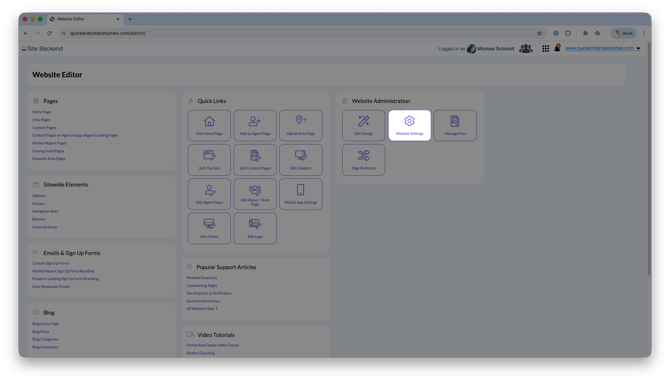
Navigate to Website Settings.
-
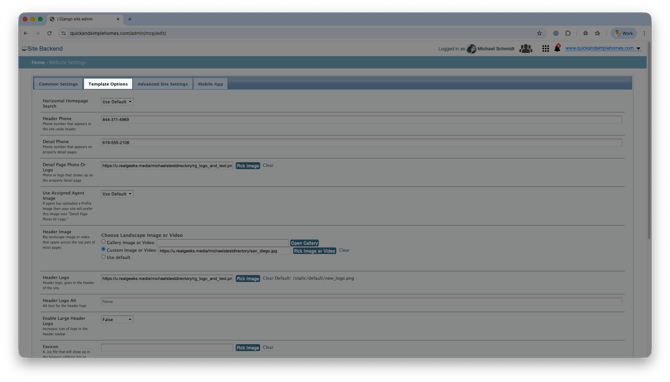
Select Template Options.
-
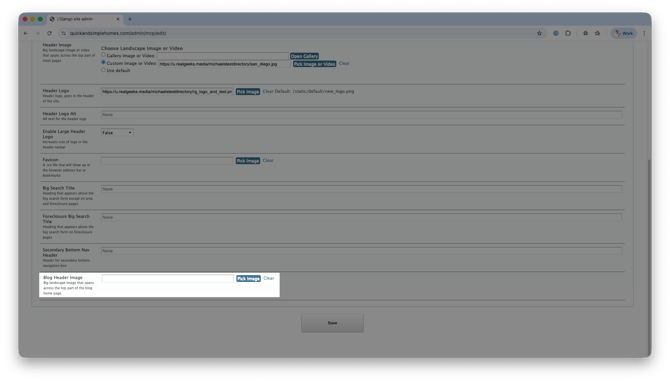
Look for the Blog Header Image option.
-
Click Pick Image
-
Upload a New Image or Select an Existing One
-
Click Save
Best Practices
Use these tips to control how your blog posts appear on the Blog Homepage.
-
Keep your Blog Homepage introduction short and welcoming.
-
Focus on explaining what type of content visitors will find.
-
If you do not want the full blog post to show on the Blog Homepage, add a page break after the first or second paragraph while writing your post. This adds a "read more" link so visitors can click to see the full article.
Frequently Asked Questions
How do I control how much of a blog post shows on the Blog Homepage?
Insert a page break after the first or second paragraph while writing a blog post. This limits what appears on the Blog Homepage and adds a "read more" link.


Need Help?
- Call us at 844-311-4969 (Mon–Fri, 8 AM–8 PM CST)
- Email support@realgeeks.com
- Visit Real Geeks University for free video courses
- Join the Real Geeks Mastermind on Facebook for peer tips and best practices