.svg)
Getting your website indexed by Bing is another way to increase your online visibility. While Google is the largest search engine, Bing powers search results for Microsoft Edge, Windows, Copilot, and other Microsoft products. Bing Webmaster Tools is a free service that lets you tell Bing your website exists and monitor how it performs in Bing search results.
Need to Know
-
Bing won't automatically know your website exists. Submitting your sitemap helps Bing find your website and begin showing it in search results.
-
If you haven't already, submit your website to Google first using our How to Get Your Real Geeks Website Found on Google (Indexing Your Website) guide
-
Bing Webmaster Tools is free to use and upload your website to
-
If your website is already verified in Google Search Console, Bing can import that verification to make setup much faster.
Table of Contents
Submit Your Website to Bing Webmaster Tools
-
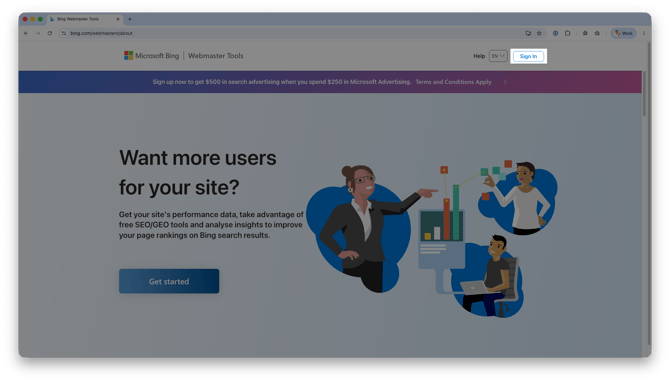
Go to www.bing.com/webmasters
-
Click Sign In.
-
Sign in with Google, Microsoft, or Facebook
-
If you sign in with Google: You can choose Import to import your website from Google Search Console, or manually add your website.
-
If you sign in with Microsoft or Facebook: Follow the prompts to manually add your website.
-
-
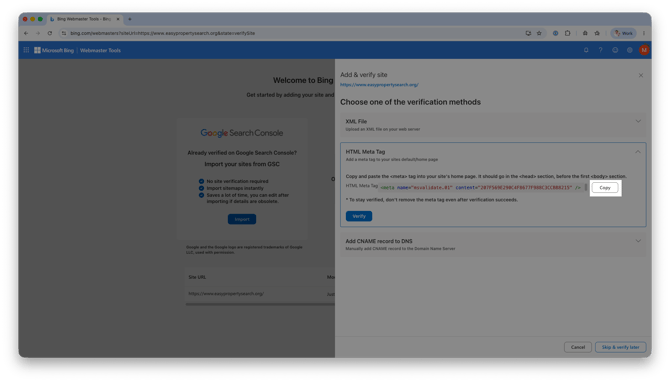
Under the Add & verify site settings, select the HTML Meta Tag method
-
Click Copy next to your personal Meta Tag
-
Send the code to support@realgeeks.com so Real Geeks support can add this to your website
-
Support email responses can take up to 1-2 business days for a response.
-
For more immediate assistance call us at 844-311-4969 to have a member of our team look at your email quicker.
-
-
Click Verify
-
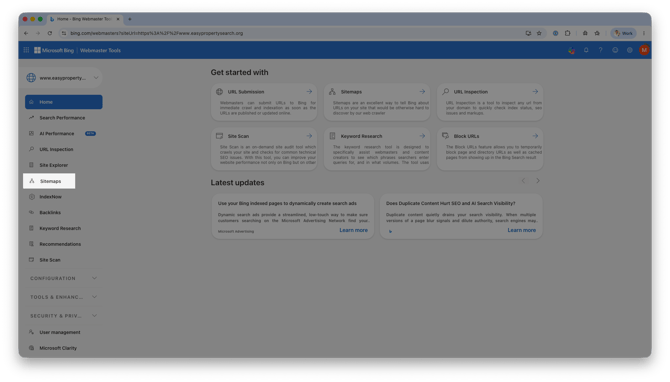
Select Sitemaps in the navigation menu
-
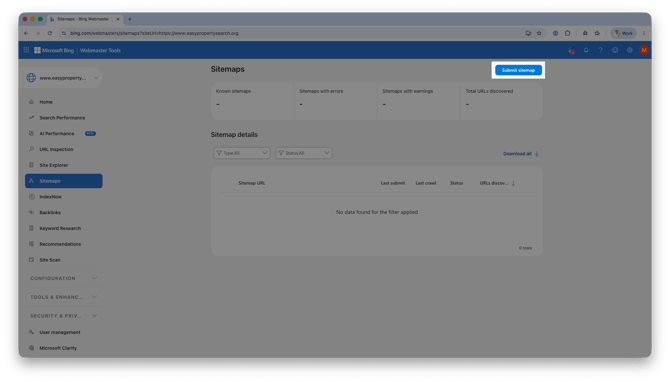
Click Submit sitemap
-
Enter your full website address with /sitemap.xml at the end.
-
Example: www.quickandsimplehomes.com/sitemap.xml
-
-
Click Submit
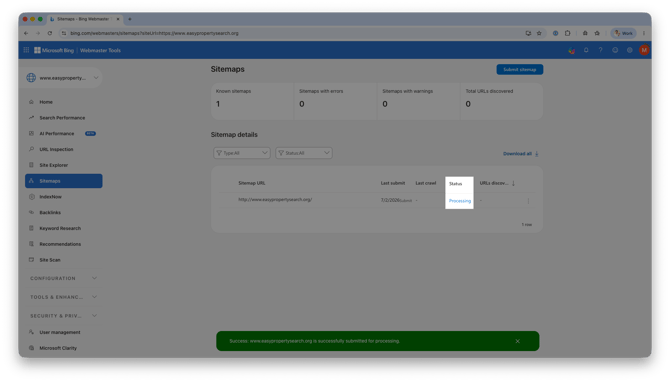
This process may take several days or longer depending on how often Bing crawls your website. You can monitor your sitemap status and indexing progress from your Bing Webmaster Tools dashboard.
Help Bing Find Your Website More Often
Submitting your sitemap tells Bing your website exists, but it doesn't guarantee your website will immediately appear in search results.
Bing wants to recommend websites that people find helpful. One of the best ways to build trust with Bing is to create useful content and give visitors a reason to keep coming back.
Think of your website like a popular local coffee shop. If customers keep coming back and new people are always walking through the door, it's a good sign the business is worth recommending to others.
Your website works the same way.
Create Helpful Content
Try to add something new to your website at least once a week.
It doesn't have to be complicated. Blog posts, neighborhood guides, local events, and buyer or seller tips are all great ways to keep your website fresh.
Need ideas?
Check out this training from SEO expert Bob McCranie for ideas on how to quickly and easily create content that Search Engines (and AI) LOVE to promote.
Give Leads a Reason to Come Back
It's not just about getting new visitors. Bing also notices when people return to your website.
Real Geeks makes this easy with automated tools like:
-
Saved Searches that notify leads about new listings.
-
Market Reports that keep homeowners updated on their local market.
-
Workflows that encourage leads to return with helpful follow-up emails and text messages.
These tools quietly bring people back to your website without you having to manually reach out every time.
The more new visitors you attract and the more existing leads return to your website, the stronger your website's reputation becomes.
Over time, that gives Bing more confidence that your website is helpful, making it more likely to recommend your website to people searching for real estate in your market.
Frequently Asked Questions
-
Do I need Bing Webmaster Tools if I've already submitted my website to Google?
Yes. Google Search Console only submits your website to Google. Bing has its own search index, so you'll need to submit your website separately. Fortunately, Bing can import your Google Search Console verification to simplify the process. -
Will submitting my sitemap improve my search rankings?
No. Submitting a sitemap puts your website on Bing's "map", but how often your website shows up depends on many factors, including the quality and relevance of your content. -
Do I need to submit my sitemap every time I update my website?
No. Once your sitemap has been submitted, Bing will automatically check it for updates. -
How long does it take Bing to index my website?
Every website is different. Some websites are indexed within a few days, while others may take several weeks depending on Bing's crawl schedule.
Need Help
-
Call us at 844-311-4969 (Mon–Fri, 8 AM–8 PM CST)
-
Email support@realgeeks.com
-
View our Live Events page for free coaching and training.
-
Join the Real Geeks Mastermind Group on Facebook for peer tips and best practices