.svg)
No website generates leads without traffic.
Think of your website like a store. Before someone can register on your website, they first need a reason to walk through the door.
Most online leads can take months (or even years) to convert, and most require multiple follow-up attempts before they ever respond.
The agents who generate the most business are the ones who consistently:
- Get people to their website
- Give people a reason to return
- Follow up over time
This guide will show you how to do all three.
Table of Contents
Action #1: Share Market Reports With Your Network
The easiest way to get people into your store is to tell them it exists. Your sphere and referral network on average, are your highest-converting leads, but many of them may not know you have a new website.
Every week you should:
-
Text 5-10 people from your phone with a link to a Market Report from your website
-
Remind them you're active in real estate
-
Ask them to watch for email updates and tell you what additional information they need.
This isn't about asking for business. It's about making sure the people who already know and trust you know where to go when they want real estate information.
How to Share a Market Report
-
Go to your website.
-
Click Market Reports.
-
Enter a city, neighborhood, or ZIP code. Refine the report later as you learn more about them.
-
Click Go to Market Report.
-
Copy the page URL and send it in a text
You can text them something like:
Hey! I have a new website, so i put together a free market report for your area that tracks local market activity. Thought you might find it helpful: [LINK]
Best Practice
Don't send people to your homepage. Instead, send them to a page on your website that's more relevant to them.
This could be:
-
A Market Report
-
Link to a Search
-
Page that answers questions or teaches them something
The more specific and personal the resource, the more likely someone is to engage with it. And trust you more for it.
Action #2: Post Helpful Things on Social Media
Your website should be more than a home search tool. It should be a place people visit to learn about your market. The best page content will typically include your local expertise, helpful information and a list of relevant properties for the topic.
Create content pages that answer questions and showcase homes related to that topic.
Strong examples include:
-
Neighborhood guides
-
Community highlights
-
Schools (and homes nearby)
-
Parks (and homes nearby)
-
restaurants (and homes nearby)
-
Local landmarks (and homes nearby)
-
Buyer tips
-
Seller tips
-
Market updates
Example of your next post
Create a page about one of your favorite local restaurants. In a page on your website, you'll want to write about:
-
why people (and you) enjoy the restaurant.
-
Highlight nearby attractions and amenities, such as a dessert spot, coffee shop, park, or entertainment venue.
-
Display homes currently available nearby.
When sharing this page on social media, keep your post:
- Helpful
- Local
- Conversational
Example:
"One of my favorite spots in town is [Restaurant Name]. Great food, great atmosphere, and it's surrounded by some really nice homes. If you've ever wondered what it's like to live nearby, I put together a quick page with info on the area and homes currently available: [LINK]"
This type of page helps people discover your website through places they're already interested in while giving them a way to explore homes in the area.
Want to make this page in your area? Learn how in our content page overview guide.
Action Item
Once a week:
-
Create one new page on your website.
-
Include helpful information about the topic.
-
Add relevant property search results.
-
Share the page on social media.
Need help?
Watch Bob McCranie's AI Content Training to learn how to create pages like these using AI.
Action #3: Keep Leads Coming Back Automatically
Most website visitors aren't ready to move yet.
Saved Searches and Market Reports help keep your leads engaged while you work to build a relationship with them.
Every property alert or market update is another opportunity to stay visible and bring someone back to your website.
How to Find Leads That Don't Have a Saved Search
-
Select Need Saved Search
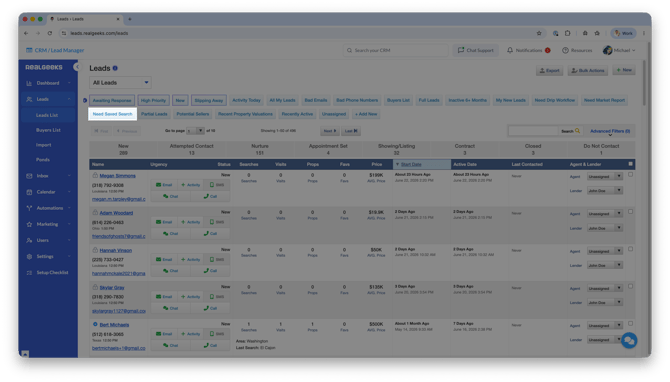
This filter shows buyer leads who are not currently receiving listing updates.
How to Create a Saved Search for Leads
-
Open the lead in the CRM.
-
On the right side, click Saved Searches.
-
Click + Add.
-
Use the Advanced Search tool to build search criteria.
-
Click Search.
-
Click Save Search at the top of the results page.
How to Find Leads That Don't Have a Market Report
-
Select Need Market Report
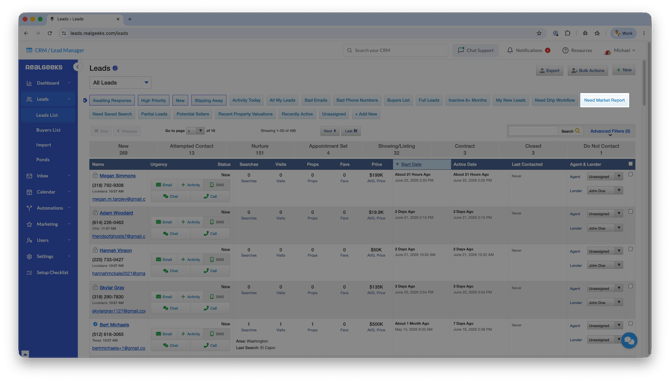
This filter shows leads who are not currently receiving market updates.
How to Create a Market Report for Leads
-
Open the lead in the CRM.
-
On the right side, click Market Reports.
-
Click + Add.
-
Customize the report for their area.
-
Click Go to Market Report.
-
Click Save Market Report & Get Monthly Updates at the top of the page.
Action Item
Once a week:
-
Review the Need Saved Search and Need Market Report filters.
-
Set up any missing searches or reports.
-
Send the lead a text to review and confirm their search.
The goal isn't just to just send emails. It's to provide valuable information that keeps leads connected to your website while they work through their decision-making process.
Action #4: Follow Up Like a Real Estate Concierge
Automation keeps you visible, but it's your expertise that wins business and separates you from Zillow or Realtor.com.
Instead of asking:
"Are you ready to buy or sell?"
You Should Ask:
- Are the listings you're receiving helpful?
- Would you like me to adjust your search?
- Are there any neighborhoods you'd like me to add?
- Are there specific features you're looking for in your next home?
- If the right home came on the market today, would you like me to notify you?
- How can I help with your decision, whether that's now or sometime in the future?
Your goal isn't to create urgency. Your goal is to become a trusted resource.
The more value you provide, the easier it becomes for someone to choose you when they're ready to buy, sell, or make a referral.
Remember: Online Leads Are a Long-Term Opportunity
-
The average online lead conversion rate is between 0.5% and 1.2%.
-
The average lead conversion timeline starts at 3 months.
-
Most online leads require between 6-10 follow-up attempts before a conversation happens.
-
48% of agents stop following up after only 1 attempt.
Getting people to your website is only the first step. The agents who consistently generate business are the ones who stay visible, provide value, and follow up over time.
Action #5: Use Advertising for Faster Results
Free traffic works.
Advertising works faster.
Some of the top options include:
-
Google Ads (learn more with Google's free training course)
-
Facebook Ads (can be managed through our Facebook Marketing Tool)
-
Instagram Ads (also available through our Facebook Marketing Tool)
If you're just getting started, focus on the free strategies first.
Once you've built consistency, advertising can help you bring more people into your store.
Your Weekly Checklist
Every week:
☐ Text 5-10 people a Market Report for their area. Don't sell yourself, just provide information.
☐ Create one new page on your website that answers a common question
☐ Share one new website page on social media
Every Day:
☐ Set up Saved Searches and Market Reports for all new leads
☐ Follow up with existing leads
Small, consistent actions lead to long-term results.
Need Help?
Building website traffic takes time and consistency, but you don't have to do it alone.
Use these guides to help you attract more visitors, create helpful content, and stay connected with your leads:
If you need help setting up any of these tools or have questions about your website, our support team is here to help.
Contact support
Live support is available Monday-Friday, 8 AM-8 PM CST
Call: 844-311-4969
Email: support@realgeeks.com