.svg)
Your Home Page is the central hub of your Real Geeks Website. Its primary job is to help visitors quickly find the information they're looking for, whether that's searching for homes, learning about a neighborhood, getting a home value estimate, or finding answers to common real estate questions.
Need to Know
- The Home Page is the central hub of your website and helps people start searching for homes immediately
- You can customize content, images, videos, banners, sidebars, and featured listings
- The Home Page should help visitors find information quickly, not contain everything in one place
Table of Contents
-
Related Articles
What Is the Home Page?
The Home Page is your website's directory. Its main purpose is to help visitors:
-
Search for homes
-
Find local information
-
Learn about your services
-
Access helpful resources
-
Navigate your website
A great Home Page doesn't try to do everything. It simply helps visitors get to the information they want as quickly as possible.
How to Edit Your Home Page
-
Open your website editor by adding /admin to the end of your website address (e.g. www.yourwebsite.com/admin)
-
Under the Pages section, select Home Page.
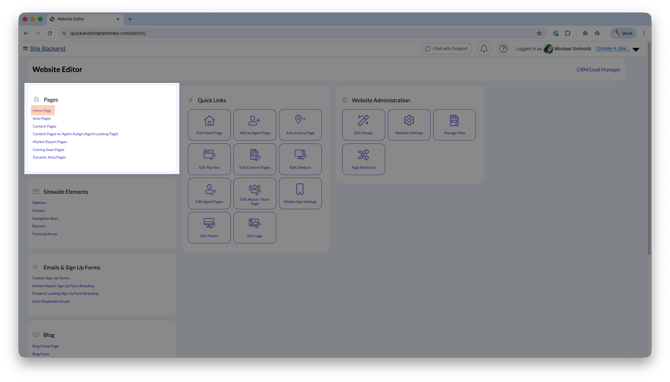
After making any changes to your home page, click Save.
Personalize Your Home Page
The Home Page editor is divided into three main sections:
Page (Meta) Details
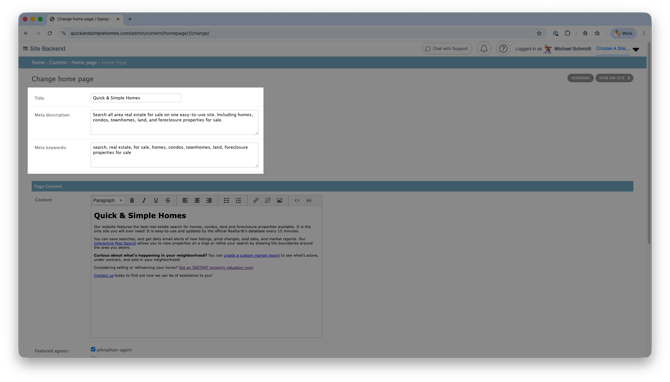 These fields help search engines understand your website.
-
Page Title
-
Meta Description
-
Meta Keywords
Use keywords related to your market, communities, and real estate services to improve visibility in search results.
Page Content
This is the main content displayed on your Home Page.
The default content is a great starting point, but you can personalize it to better reflect your business and market.
Consider including:
-
A brief introduction to your business
-
The areas you serve
-
Links to important resources
-
Information that helps visitors get started
Website Settings
Below the Page Content section, you'll find additional customization options for your Home Page.

Override Landscape Image or Video
 Personalize the image or video that appears at the top of the page. Choose something that matches the page's topic or local area to make the page more relevant and engaging to visitors.
Why use it: A strong local image or video can grab a visitor's attention and immediately show them that they've found information specific to what they're looking for.
Sidebar / Footer / Banner Options
 Use these options to add helpful information and resources in different areas of your website.
- Sidebar: Give visitors quick access to related pages, resources, or other information they may want to explore.
- Footer: Add important information that visitors can access from the bottom of your website.
- Banner: Highlight an important announcement, resource, or call to action you want visitors to notice.
Why use them: Don't let a useful page become a dead end. These areas can point visitors toward more of your content, encourage them to explore your website, and give them more opportunities to connect with you.
Learn More:
Property Display Search Options
Customize how property listings are displayed on your Content Page.

Why use it: Make listings easier for visitors to browse and focus their attention on the property information that's most useful to them.
Learn More:
Search Form Display Options
Customize the property search and headline visitors see on the page. A search gives visitors an easy next step when they're ready to start exploring homes.
 Why use it: Make it easy for visitors to go from learning about an area or topic to actually searching for homes. The more useful your website is, the more opportunities you have to keep visitors engaged and turn that traffic into leads.
Please Note
The available search options depend on your website design. Miranda, Miranda-Thin, and Molly support additional search customization. Anna and Anna Modern use the type-ahead search.
Learn More:
Best Practices
One of the most common mistakes agents make is spending too much time trying to create the "perfect" Home Page.
Instead, prioritize building the pages visitors find most valuable and are actively looking for, such as:
-
Neighborhood Pages
-
Content Pages
-
Home Valuation Pages
-
Market Report Pages
-
Area Guides
Your Home Page should simply help visitors discover those resources and take the next step.
Keep it simple:
-
Make search easy to find
-
Highlight your most valuable resources
-
Keep content concise
-
Focus on navigation over information overload
Frequently Asked Questions
-
Should I put all my information on the Home Page?
No. The Home Page should direct visitors to more focused pages and resources throughout your website. -
Can I change the main image on my Home Page?
Yes. You can upload a custom image or video using the Override Landscape Image or Video setting. -
Can I control which listings appear on the Home Page?
Yes. Use the Property Display Search Options to customize featured listings. -
Can I customize the text above the search bar?
Yes. The Search Form Display Options allow you to personalize the heading displayed above the property search area.
Need Help?
-
Call us at 844-311-4969 (Mon–Fri, 8 AM–8 PM CST)
-
Email support@realgeeks.com
-
View our Live Events page for free coaching and training.
-
Join the Real Geeks Mastermind Group on Facebook for peer tips and best practices